

4 Ways to Do More in Less Time with GenAI Recruiting in Your Talent CRM
Recruitment has always been about relationships, but the window for building them has changed. Candidates today are more informed, more selective, and making decisions about whether to join your organization faster than ever before. They research companies before applying, form opinions based on early interactions, and move on when outreach feels delayed or impersonal. For talent teams, this means that how a candidate is engaged long before a role is filled matters as much as the hiring process itself.
Managing those relationships at scale, keeping track of conversations, follow-ups, and long-term interest across hundreds of candidates, requires more than good intentions. It requires structure, visibility, and the ability to act quickly without sacrificing quality.
This blog's walk-through is where Generative AI (GenAI) inside Phenom Talent CRM makes a measurable difference. By handling the repetitive, pattern-based work of drafting, reviewing, and preparing, it returns recruiter time to the part of the job that no technology can replace: building genuine connections with the right people at the right moment.
Gain Hours Each Day with GenAI Recruitment
The pattern is familiar. A recruiter opens a candidate profile, drafts an outreach email from scratch, moves on to the next candidate, and repeats the process. Later in the day, they review ten resumes to shortlist three, reading each one in full to extract the same types of information. Before a panel interview, each interviewer prepares their own questions independently, with no shared framework and no guarantee of consistency. Before a panel interview, each interviewer independently develops their questions without a shared framework or assurance of consistency. None of this work requires human judgment. It requires time, and it takes more of it than most teams can afford.
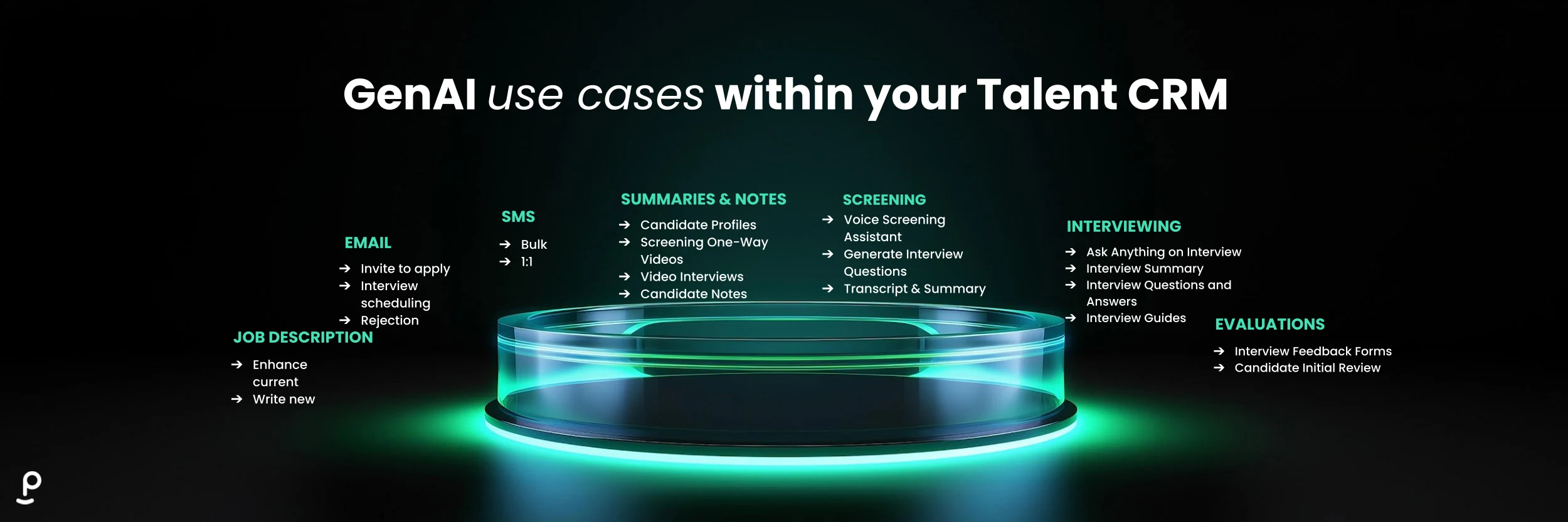
The four workflows below address each of these friction points directly, using GenAI to handle the predictable, pattern-based work so recruiters can focus on the parts of hiring that actually require their expertise.
1. Write Personalized Candidate Emails In Seconds
Outreach quality matters, but drafting individual messages for every candidate in a pipeline is not sustainable at scale. Recruiters either spend significant time on personalisation or send generic messages that do not convert. GenAI in Phenom Talent CRM generates tailored outreach automatically by drawing on candidate profile data and job context, producing a message that reflects the specific candidate and role without requiring the recruiter to write from scratch.
Using GenAI email in Phenom Talent CRM
Navigate to the candidate or segment you want to contact and open the email composition view. From there:
Select the communication type that fits the situation: outreach for new candidates, follow-up for pipeline candidates, or nurture for longer-term prospects
Review the AI-generated draft. The system uses the candidate's profile and the associated job details to tailor the message
Edit where needed or send directly. The 95% send-without-edits rate reflects that most output requires no changes before it reaches the candidate
For bulk outreach to a segmented candidate group, the same GenAI capability generates individual messages for each recipient rather than a single template applied uniformly, so personalisation scales without additional recruiter effort.
Related read: The Complete Guide to a Seamless AI-Powered Talent CRM Migration
2. Review Candidates Faster with GenAI Summaries
Resume review is one of the most time-consuming parts of early-stage screening. Most of that time goes to extracting the same types of information from every candidate: relevant experience, key skills, and obvious gaps relative to the role. The profile summary capability automates this by analyzing the candidate record and producing a concise output that surfaces what matters, so recruiters can make an informed first assessment without reading the full document.
Using GenAI candidate summaries in Phenom Talent CRM
Open the candidate profile for the individual you want to review. From there:
Trigger the summary generation from the candidate profile view
Review the output, which highlights relevant skills, experience, and gaps relative to the role attached to the candidate record
Use the summary to make an initial screening decision or to prepare for a follow-up conversation, with the full profile available if deeper context is needed
Candidate summaries are particularly useful when a recruiter is working through a large applicant pool for a high-volume role. Rather than spending equal time on every resume, the summary layer allows for a fast first pass that surfaces the strongest candidates before any manual review begins.
3. Build structured screening questions for any role
Screening questions are often inconsistent across roles and teams. One recruiter builds a thorough set of requirements for a technical role, and then another sends candidates through without any structure at all. The result is uneven evaluation quality and a process that depends on individual effort rather than a shared standard. The screening question capability automatically generates role-specific questions from the job description, giving every recruiter a structured starting point without setup time.
Using GenAI screening questions in Phenom Talent CRM
Open the relevant job or requisition and navigate to the screening setup. From there:
Input or confirm the job description as the basis for question generation
Review the AI-generated question set, which is tailored to the role's requirements and responsibilities
Edit, remove, or approve individual questions before attaching them to the screening workflow
Pro tip: Use the AI question set as a baseline and add one or two role-specific questions that reflect your organization's evaluation criteria. The system handles the standard framework; your additions make it specific to your hiring context.
Consistent screening questions across all candidates for a role also create a more defensible evaluation record. When every candidate is assessed against the same criteria, the documentation that supports a hiring decision is more complete and easier to review.
4. Create Interview Guides Aligned To Role Requirements
When interviewers prepare independently, the evaluation of the same candidate varies depending on who they spoke to and what that person decided to ask. A standardized interview guide solves this, but building one for every role takes time that most teams don’t have. The platform generates a full framework from the role or requisition details, including competencies, questions, and evaluation criteria, so that every panel member works from the same structure.
Using GenAI interview guides in Phenom Talent CRM
Navigate to the role or requisition and from there:
Select the role or requisition as the basis for guide generation
Review the AI-generated guide, which includes competencies relevant to the role, suggested questions for each competency, and evaluation criteria for assessing responses
Share the guide with the interview panel before the scheduled session, so every participant is working from the same structure
Related read: Dual Power: How Roush Shifted from Passive Reviewing to Active Candidate Engagement
Real Results From Teams Already Using These Workflows
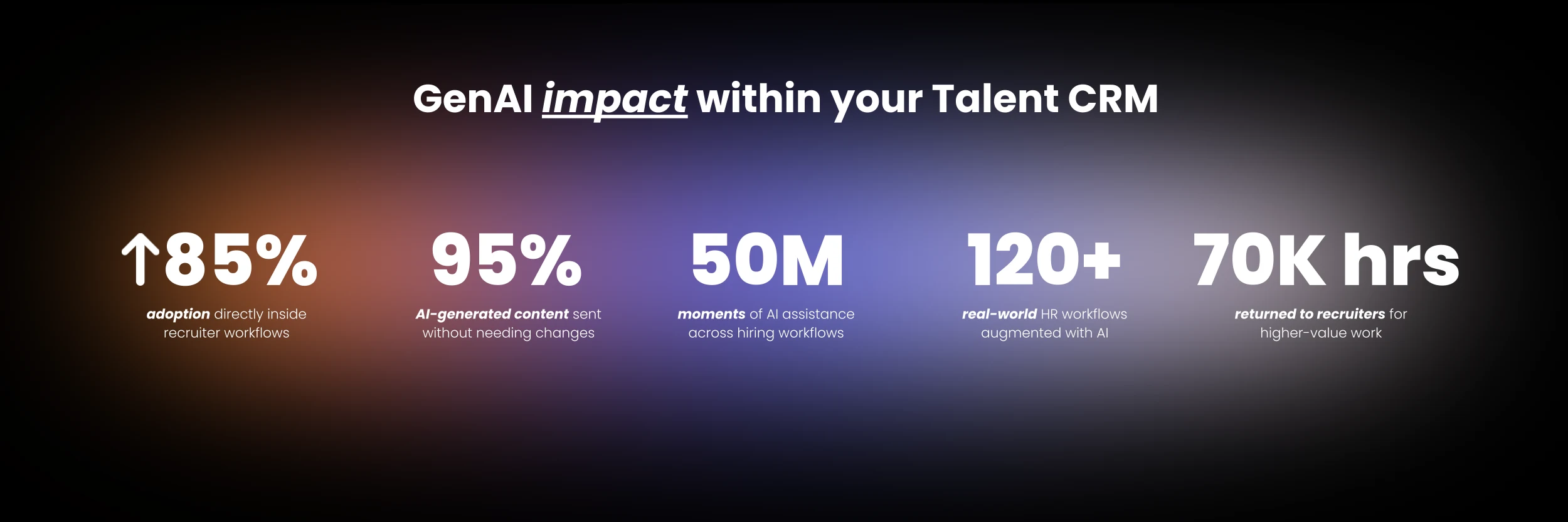
The results below reflect outcomes from Phenom customers using GenAI across their Talent CRM workflows. The scale of adoption reflects that these capabilities are embedded directly in the workflows recruiters already use, rather than requiring a separate tool or process change. The following numbers reflect that impact at scale
70,000 hours returned to recruiters: time previously spent on drafting, reviewing, and preparing materials is now handled by GenAI, freeing recruiters to focus on review and decision-making rather than creation.
95% of AI content is sent without edits: output quality is consistently high so that recruiters can send the generated message or document without modification.
85% adoption: GenAI capabilities are being used at scale because they sit within recruiters' workflows and processes.
Getting The Most From What You Already Have
The fastest way to see value is to begin with the workflow that currently consumes the most recruiter time, and build from there:
Start where work already happens: identify the task your team repeats most often and activate the corresponding GenAI capability first. For most teams, outreach email generation or candidate summaries deliver the most immediate return.
Use for consistency before creativity: the highest-value application of GenAI in early adoption is not generating something new. It is producing a reliable, consistent output that a recruiter can review and send faster than they could write it themselves.
Measure time saved: track how long specific tasks took before and after GenAI was introduced. Time-to-send on outreach, time spent on resume review, and time to prepare interview materials are all measurable and will show a clear return.
Expand across the hiring lifecycle once the first workflow is running: each additional capability adds to the cumulative time saved without requiring separate onboarding or a new tool.

Less Administration, More Hiring
The goal of GenAI in a Talent CRM is not to replace recruiter judgment. It is to remove the administrative layer that sits between a recruiter and the work that actually requires their expertise. When drafting, reviewing, and preparing are handled automatically, the time those tasks consume becomes available for candidate conversations, hiring manager alignment, and the decisions that determine who gets hired. That shift is what 70,000 hours returned to recruiters actually means in practice.
Ready to explore GenAI in your Talent CRM? The fastest way to understand what is already available in your instance is a direct conversation with your Account Manager.

Devi is a content marketing writer passionate about crafting content that informs and engages. Outside of work, you'll find her watching films or listening to NFAK.


Get the latest applied AI insights delivered to your inbox.
Sign up to stay up-to-date on the latest original content from Phenom, including new podcast episodes, events, and more.


