

X+ Screening Basics: Unlocking Recruiter Time to Keep Candidates Moving
Most recruiting teams using Phenom X+ Screening are using only a fraction of what it can actually do. The pre-screening form is set up, a questionnaire or two is live, and phone screens are ready. That's a good start, but the product goes much further. Multi-stage screening flows, AI-driven evaluation, Voice Agent scoring, and talent pool routing all work together to surface the strongest candidates, so recruiters can focus their time on making the decision on who moves forward.
At IAMPhenom, Customer Value Manager Patrik Magitteri ran a value workshop on getting more out of X+ Screening, covering the full range of question types, how to build a workflow that fits into existing hiring processes, and the configuration details that unlock the most value. This blog captures everything covered in the session so you and your team can unlock the full potential of your Phenom solution.
In this Article:
Why is Early-Stage Screening One of Hiring's Biggest Bottlenecks?
The screening process is one of the biggest slowdowns in hiring. As Magitteri shared, "From our point of view, the screening process is one of the biggest slowdowns in hiring. With faster and smarter screening, we can reduce your drop-off, get stronger candidates, identify them earlier, and really remove the friction in that first hiring step."
That friction shows up on both sides. Recruiters spend time on calls with candidates who don't clear basic requirements. Candidates, meanwhile, have to rearrange their day to interview for a job that might not be the right fit. As Magitteri noted: "Right now, if I want to take an interview with another company, I would have to work around my work schedule and block my time, and that's not really ideal. With screening, you can do it after working hours or in the morning before you start work, so it really gives candidates flexibility." X+ Screening addresses both. Candidates complete a tailored questionnaire on their own schedule while recruiters get structured, comparable responses before anyone picks up the phone.
Why is Early-Stage Screening One of Hiring's Biggest Bottlenecks?
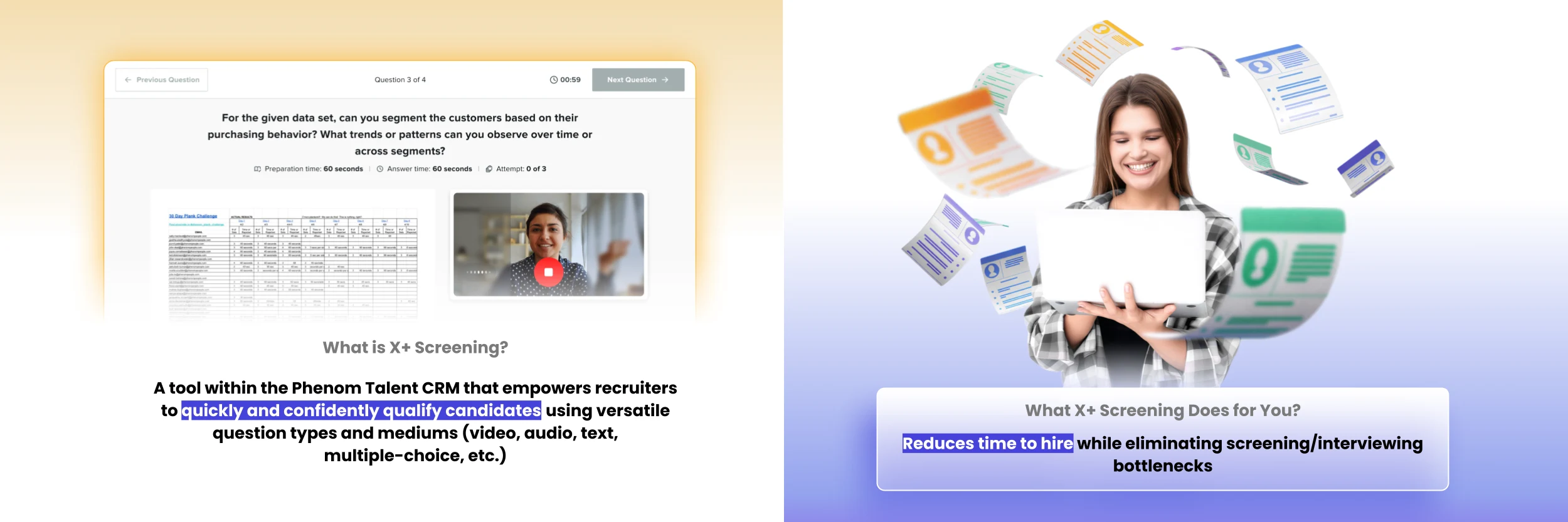
X+ Screening is a solution inside Phenom Talent CRM that’s designed to do the qualifying work before recruiter involvement. As Magitteri described it: "We designed it to do the heavy lifting of qualifying candidates, so that even before you pick up the phone, you have a good idea of who should go on to the next step, that you have all the key requirements covered, and that you get real insights — a glimpse of the candidate beyond what you see just from a resume."
It automates early-stage evaluations through tailored questionnaires built from a range of question types and formats, standardizing the process in a way that is consistent and fair across every candidate.
A Closer Look at the X+ Screening Types
Different roles require different approaches, so X+ Screening is built with maximum flexibility. One format simply won't work for a warehouse operative, a corporate account manager, and a graduate engineer. Below you will find the available screening types and where each one fits best:
Pre-Screening (Knockout Questions): These filter out candidates who don't meet non-negotiable requirements: no driver's license for a truck driver role, not passing the bar for a legal position, or wrong graduation timeline for a graduate program. They're answered instantly and decided automatically.
Video: Useful when you want to understand motivation, communication style, or how well someone would represent your brand. It's not just for corporate roles; this feature is also beneficial for frontline positions like store advisors who interact daily with customers. Remember, a short video response tells you far more than a resume ever could.
Audio: For roles where video isn't necessary, like warehouse, logistics, or transportation positions, audio lowers the barrier for candidates who may find camera recording uncomfortable. As Magitteri put it: "With video, there's a bigger threshold to jump over, especially if you've never done it. Audio can lower that threshold, particularly for roles where you don't necessarily need to see the candidate on video." You still get a real sense of how they communicate, without the added friction.
Case Studies and Assessments: These are build-your-own assignments with a time limit. These are most commonly used in early-career hiring where academic credentials alone don't tell you much. One use case that came up: scored knowledge questions for STEM graduate recruitment, where candidates who score highest move straight to an interview with no manual sorting required.
Voice Agent: This AI agent handles the phone screen as a natural conversation. It collects the necessary information, applies the scoring criteria configured by the client, and delivers transcripts and recommendations. At scale, Phenom has screened 65K+ candidates with an 86% completion rate, reducing time-to-screen from days to less than 1 day and removing 25K hours of recruiter effort. Remember, this is the average with many clients handling even higher recruiting volumes.
How Automated Screening Works: A Step-by-Step Walkthrough
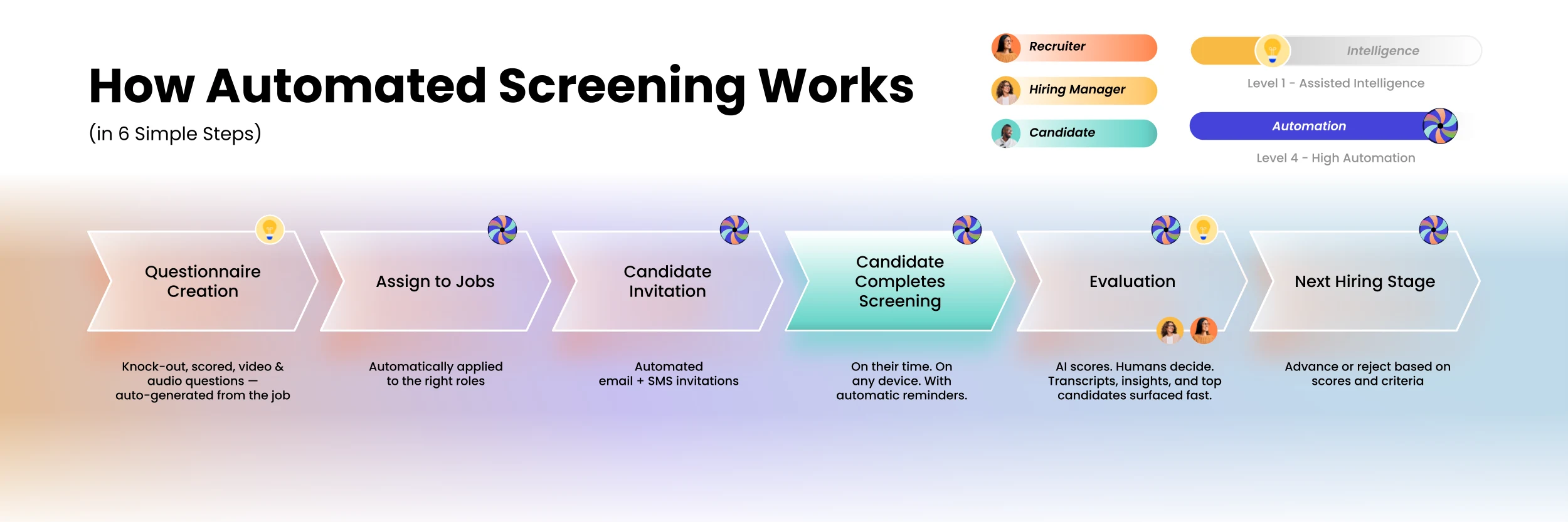
X+ Screening runs across six connected steps from questionnaire creation to hiring decision. The following outlines how each stage connects and where automation takes over.
Step 1: Create the questionnaire: Inside the Talent CRM, you choose your question types, add knockout criteria, assign point values to scored questions, and organize sections by theme, whether that's motivation, skills, or experience. Generative AI can draft a full questionnaire based on the job title and the competencies you want to test. Pre-built templates are available for common roles and are fully adjustable.
Step 2: Assign it to jobs: This can be done manually or set up as a rule. If you've tagged a questionnaire to a specific job category, say marketing roles in a particular region, the system picks it up automatically when a matching job is added.
Step 3: Invite candidates: Select individuals or a batch, choose email or SMS, set the deadline, and add automated reminders so no one falls through because a link expires. This step can also be triggered automatically from a hiring status change or when a candidate applies.
Step 4: Candidate completes the screening: They get a clear overview of what's involved: question count, estimated time, and format, along with tips and a support contact if they run into issues. It works on mobile and is designed to feel approachable rather than transactional.
Step 5: Evaluate with AI-powered insights: Once submitted, AI screening insights surface immediately: reasons to advance the candidate, areas of potential concern, how they performed against the role's core skills, and the methodology behind the scoring. Individual video and audio responses can be reviewed with transcripts and timestamps. Ratings from multiple evaluators roll up into a single overall score.
Step 6: Move candidates forward or redirect them: An approval sends the candidate to the hiring manager. A rejection automatically routes them to the talent community, keeping them in the system for future roles where they may be a stronger fit.
Seeing It in Action: The Early Careers Use Case
To make the workflow concrete, Magitteri used a graduate engineering program as a real-world example. After a candidate applies, they immediately receive an invitation to a two-stage screening. The first stage checks qualifications: GPA, field of study, and expected graduation date. As he explained: "If I hire people in the Fall and I need them to graduate by summer, and somebody says they're going to graduate in the summer next year, they're not a great fit — even if they're the best candidate otherwise. I'd need to wait until they graduate a year later." Those who clear stage one move to a one-way video interview focused on motivation and skills. After the recruiter review, AI insights surface on top of the evaluation to help prioritize who goes to the hiring manager.
The Business Case: Real Results from X+ Screening
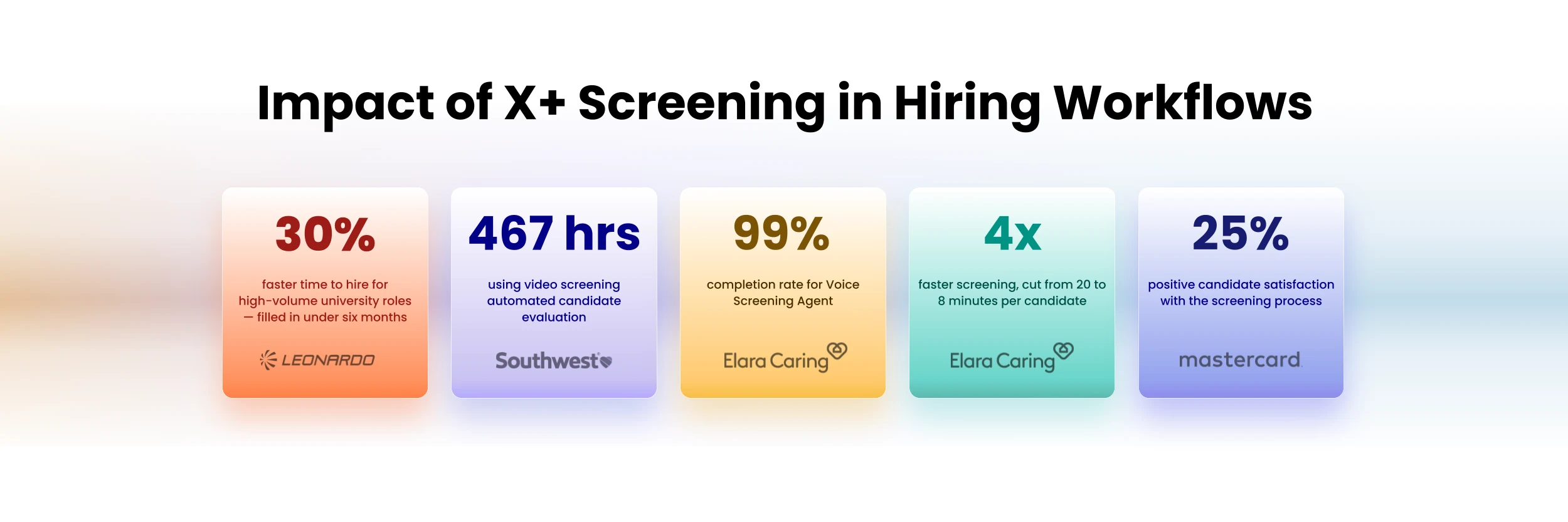
The proof of any hiring tool is in how it performs in practice. The following results reflect what teams have seen across different roles and hiring volumes:
Result | Impact |
|---|---|
30% faster time to hire for high-volume university roles | High-volume roles filled in under six months, keeping hiring on track with business demand |
467 hours saved through automated candidate evaluation | Recruiters redirected from manual review to higher-value pipeline and talent engagement work |
99% completion rate using Voice Screening Agent | Fewer candidate drop-offs and a more complete pool to evaluate at scale |
Screening time cut from 20 to 8 minutes per candidate | Higher recruiter capacity to process more applicants without adding headcount |
25% increase in candidate satisfaction scores | A stronger employer brand impression is formed at the earliest stage of the hiring process |
Three Practical Steps to Get Started with X+ Screening
Getting started doesn't require a complete overhaul of your hiring process. Magitteri's recommendation was to keep it focused: "Pick the right roles, test, and reiterate. Start with a high-volume role or a hard-to-fill role, then take those results, take the learnings, and apply them to new roles." The following three steps are what he recommends for teams getting started.
Start with high-volume or hard-to-fill roles. These show the clearest return fastest. Run a cohort, take those learnings, and build from there before expanding to other role types.
Use screening to replace a step, not add one. As Magitteri put it: "Use it to replace steps, not to add steps. If you just add more steps to the process, it's not going to make you more efficient." The screening should take the place of the first phone call, not stack on top of it.
Let automations carry the follow-through. Hiring status changes, completed screenings, advancement or rejection decisions: all of these can trigger the next step automatically. The fewer recruiters are manually moving candidates through stages, the more time they have for work that actually requires their judgment.
See What X+ Screening Can Do for Your Roles !
Watch the full session on demand for a complete walkthrough, or head to the Phenom community knowledge base for setup guides, role-specific templates, and use case examples your team can put to work right away.

Devi is a content marketing writer passionate about crafting content that informs and engages. Outside of work, you'll find her watching films or listening to NFAK.


Get the latest talent experience insights delivered to your inbox.
Sign up to the Phenom email list for weekly updates!


