Log inBook Demo
Book Demo
  • Applied AI
  • Engines/Integrations
  • Ontologies
  • AI Agents
  • WorkOps
  • Skills
  • Generative AI
  • AI Ethics
  • Automation
  • Security & Trust
Explore Phenom AI
Hire Faster
  • Talent CRM
  • Intelligent Career Site
  • Automated Interview Scheduling
See all
Develop & Retain Longer
  • Onboarding
  • Talent Marketplace
  • Career Pathing
See all
Workforce Planning
  • Workforce Intelligence
  • X+ Talent Advisor
See all
Build Trust in AI
  • Unified Orchestration Engine
  • Application Performance Monitoring
  • AppTrail
See all
The AI Agents
  • Voice Screening Agent
  • Fraud Detection Agent
  • Career Coach Agent
See all
All products
Healthcare
  • Hospitals
  • Elderly Care
  • Home Health
See all
Technology & IT
  • Business & IT Services
  • E-Commerce
  • Data Centers
See all
Financial Services
  • Consumer Banking
  • Consumer Finance
  • Insurance
See all
Transportation & Logistics
  • Airlines
  • Trucking/Logistics
  • Rail, Bus & Taxi
See all
Retail & Hospitality
  • Quick Service Restaurants
  • Gas & Convenience Stores
  • Hotels/Lodging & Resorts
See all
Energy & Utilities
  • Electricity & Power
  • Oil & Gas
  • Water & Waste Treatment
See all
Manufacturing
  • Pharmaceuticals
  • Semi-Conductors
  • Food & Beverage
See all
Public Sector
  • Federal Government
  • State & Local Government
  • Higher Education
See all
All Industries
Attract & Engage
  • Create Better Job Descriptions
  • Source the Best Talent
  • Attract & Engage Candidates
See all
Hire Efficiently
  • Validate Candidate Skills
  • Eliminate Scheduling Friction
  • Analyze Every Interview
See all
Fill Roles Faster
  • Scale High-Volume Hiring
  • Compress Time-to-Hire
  • Source Specialized Talent
See all
Develop Better
  • Speed Up Onboarding
  • Mobilize Internal Talent
  • Build Your Next Leaders
See all
Build the Right Workforce
  • See Skills Supply & Demand
  • Redesign Work
  • Plan Your Workforce
See all
Grow your business
  • Bridge the Execution Gap
  • Accelerate AI Adoption
  • Activate Your EVP
See all
Build trust in your AI
  • Meet Strict Security Standards
  • Prove Compliance
  • Unify Your Tech Stack
See all
All use cases
Resources
  • Blog
  • Customer Stories
  • Webinars
  • Events
  • eBooks & Reports
  • Free Tools
  • Community
  • AI & Automation Lab
Phenom Studios
  • All Videos
  • Product tours
  • AI Day On Demand
  • IAMPHENOM On Demand
  • IAMPHENOM India On Demand
  • IAMPHENOM Europe On Demand
All resources
About Phenom
  • About us
  • Our customers
  • Newsroom
  • Careers
  • AI Ethics
  • Security & Trust Center
  • Partners
  • Contact us
For Customers
  • Customer Experience
  • Global Professional Services
  • Global Customer Care
  • Customer Value
  • Training & Certification
  • Refer a Phriend
  • Applied AI
  • Engines/Integrations
  • Ontologies
  • AI Agents
  • WorkOps
  • Skills
  • Generative AI
  • AI Ethics
  • Automation
  • Security & Trust
Explore Phenom AI
Hire Faster
  • Talent CRM
  • Intelligent Career Site
  • Automated Interview Scheduling
See all
Develop & Retain Longer
  • Onboarding
  • Talent Marketplace
  • Career Pathing
See all
Workforce Planning
  • Workforce Intelligence
  • X+ Talent Advisor
See all
Build Trust in AI
  • Unified Orchestration Engine
  • Application Performance Monitoring
  • AppTrail
See all
The AI Agents
  • Voice Screening Agent
  • Fraud Detection Agent
  • Career Coach Agent
See all
All products
Healthcare
  • Hospitals
  • Elderly Care
  • Home Health
See all
Technology & IT
  • Business & IT Services
  • E-Commerce
  • Data Centers
See all
Financial Services
  • Consumer Banking
  • Consumer Finance
  • Insurance
See all
Transportation & Logistics
  • Airlines
  • Trucking/Logistics
  • Rail, Bus & Taxi
See all
Retail & Hospitality
  • Quick Service Restaurants
  • Gas & Convenience Stores
  • Hotels/Lodging & Resorts
See all
Energy & Utilities
  • Electricity & Power
  • Oil & Gas
  • Water & Waste Treatment
See all
Manufacturing
  • Pharmaceuticals
  • Semi-Conductors
  • Food & Beverage
See all
Public Sector
  • Federal Government
  • State & Local Government
  • Higher Education
See all
All Industries
Attract & Engage
  • Create Better Job Descriptions
  • Source the Best Talent
  • Attract & Engage Candidates
See all
Hire Efficiently
  • Validate Candidate Skills
  • Eliminate Scheduling Friction
  • Analyze Every Interview
See all
Fill Roles Faster
  • Scale High-Volume Hiring
  • Compress Time-to-Hire
  • Source Specialized Talent
See all
Develop Better
  • Speed Up Onboarding
  • Mobilize Internal Talent
  • Build Your Next Leaders
See all
Build the Right Workforce
  • See Skills Supply & Demand
  • Redesign Work
  • Plan Your Workforce
See all
Grow your business
  • Bridge the Execution Gap
  • Accelerate AI Adoption
  • Activate Your EVP
See all
Build trust in your AI
  • Meet Strict Security Standards
  • Prove Compliance
  • Unify Your Tech Stack
See all
All use cases
Resources
  • Blog
  • Customer Stories
  • Webinars
  • Events
  • eBooks & Reports
  • Free Tools
  • Community
  • AI & Automation Lab
Phenom Studios
  • All Videos
  • Product tours
  • AI Day On Demand
  • IAMPHENOM On Demand
  • IAMPHENOM India On Demand
  • IAMPHENOM Europe On Demand
All resources
About Phenom
  • About us
  • Our customers
  • Newsroom
  • Careers
  • AI Ethics
  • Security & Trust Center
  • Partners
  • Contact us
For Customers
  • Customer Experience
  • Global Professional Services
  • Global Customer Care
  • Customer Value
  • Training & Certification
  • Refer a Phriend
Book DemoLog in

Employee Relationship Management

Most HR teams answer workforce questions with stale data pulls. Phenom Employee Relationship Management (ERM) gives HR real-time data insights: open a skill to see who holds it and what requires it, or open an employee to see their skills against the next role. Your HCM stays the system of record.

Book a demo

Every workforce question turns into a data pull.

Leadership asks if the company has the skills for next year's plan. The answer is spread across an HCM field with outdated employee info, scattered learning records, and flimsy job architecture. Phenom ERM keeps the entire picture current, organized, and solid so HR has answers, not guesses.

Open any skill and see the workforce through it.

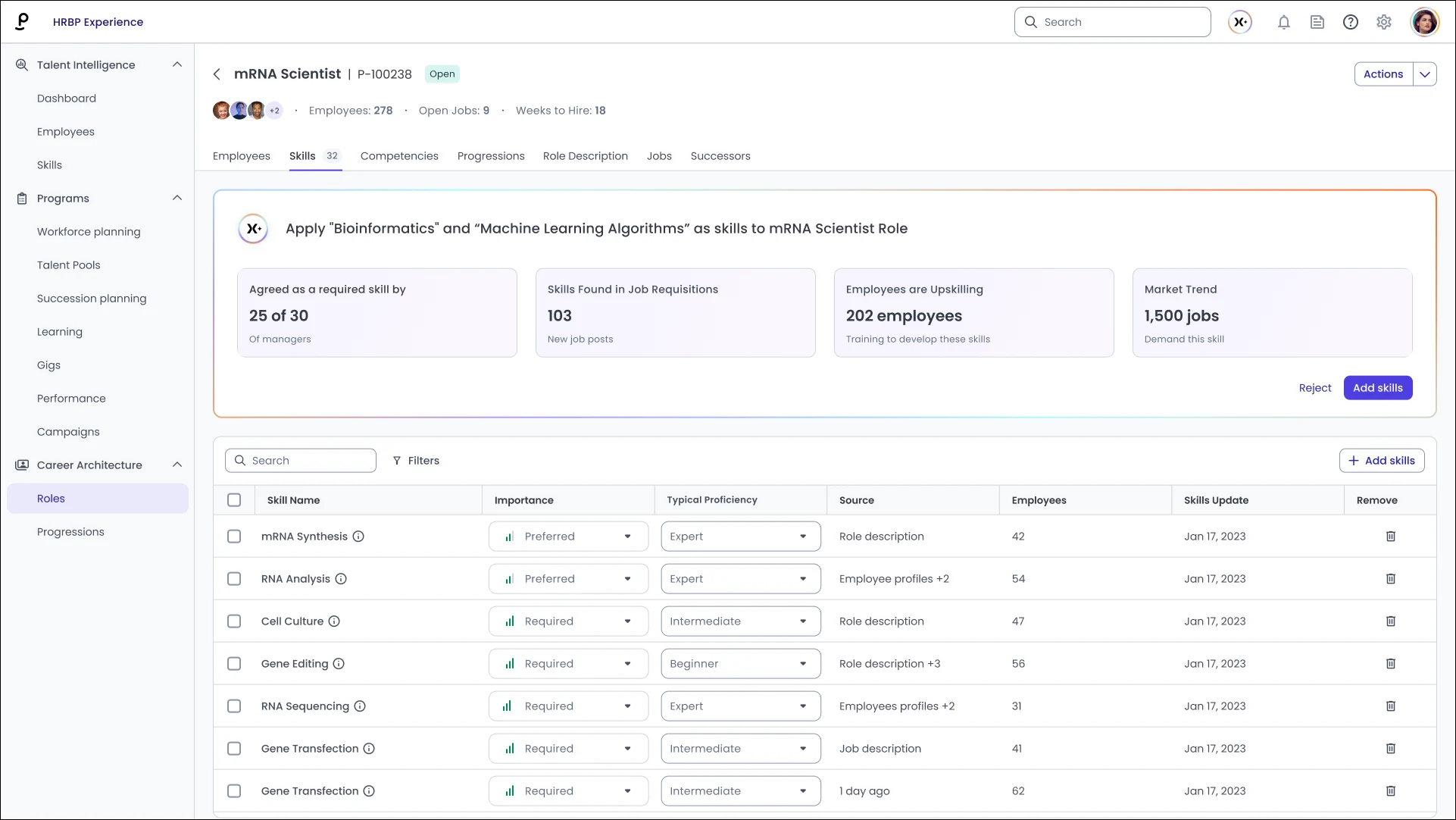
ERM reads every skill on every profile through one ontology, mapping your HCM, course records, and employee entries to a single skill. Open a skill and ERM shows who's endorsed for it, which roles and open jobs require it, and which courses, mentors, and gigs build it. Open an employee and their skills sit against the next role's level. Profile-building and validation agents are configured here.
Most skills data records what someone typed in once.

An HCM holds a skills field; an employee fills it in at hire and rarely again. A taxonomy project defines what those skills mean, then ages the day it publishes. Neither knows that project management is different work for a site manager and a product manager. Neither says whether a skill was ever checked. Phenom ERM reads skills through an ontology built for that difference, and marks the ones that were checked.

Skills understood in context: The ontology reads a skill as tasks that differ by role and industry.

Your HCM stays the system of record: ERM reads it, your LMS, and your ATS into one skills picture.

Checked skills are marked as checked: Endorsed skills are counted apart from self-reported ones.

V1

Turn workforce data into answers, and answers into next steps.

Answer a skills question in the meeting where it was asked.

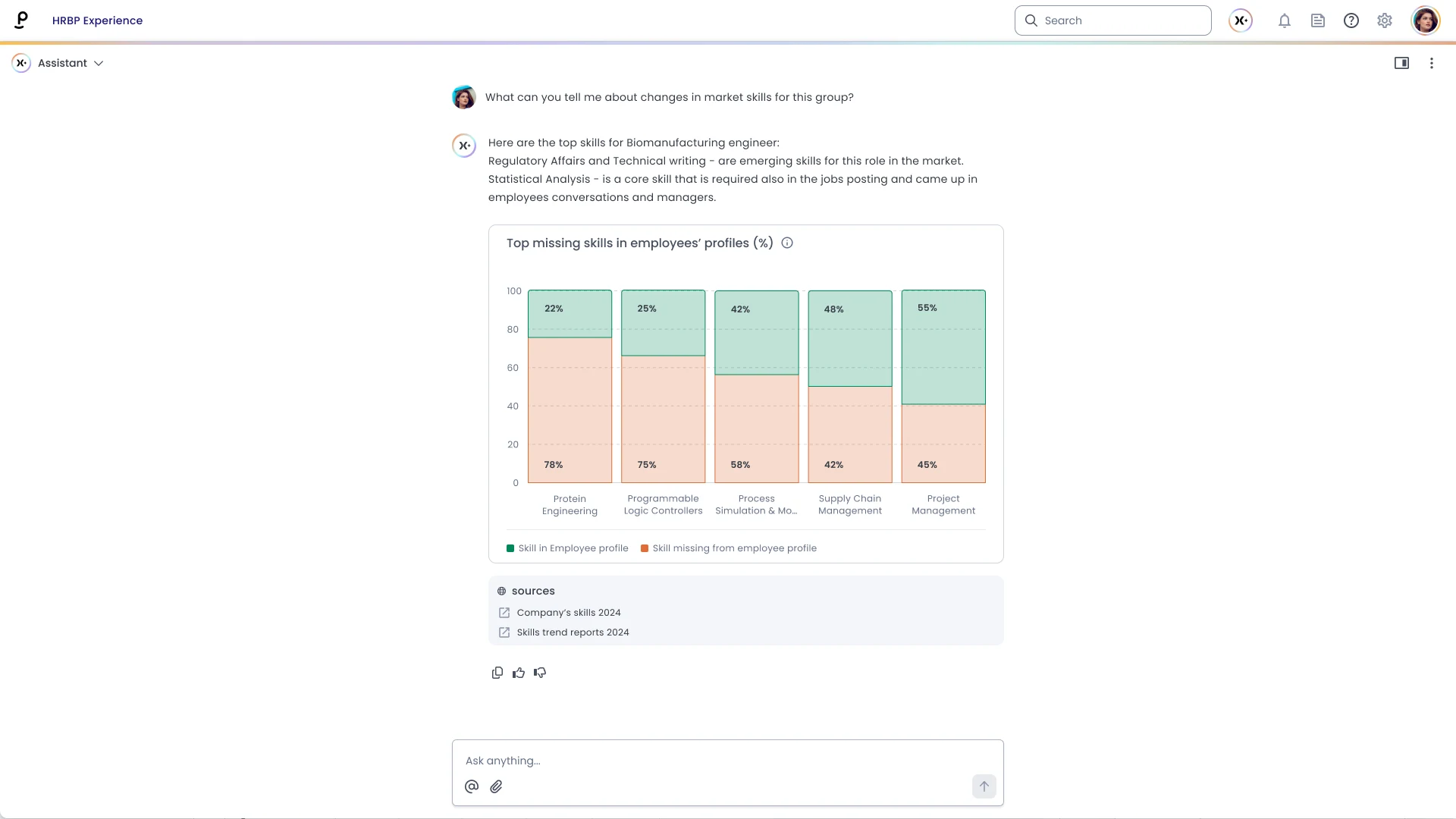
Leadership wants to know whether the company has the skills for a new line of work. HR opens the skill in ERM sees how many employees hold it, how many are endorsed for it, which roles and open jobs require it, and which courses build it. Filter by location, department, or level. The counts come from profiles kept current, so HR speaks to what’s there now.


Filter to the population that matters. Location, department, and level narrow every count at once.


From the count to the people. Each tile opens to the people it counts, so a number becomes a list.


Who has it, beside what needs it. People with a skill sit beside the roles and jobs that need it.


missing skills

Know which skills on a profile have been checked.

The usual objection to skills data is that people typed it in themselves. ERM separates self-reported and endorsed skills with agents that add and validate data. Profile Builder Agent interviews an employee and adds skills to employee profiles; Skills Validation Agent assesses a skill against the role and returns a scorecard. HR can adjust the skills mapped to a role and override a recommendation.


Endorsed and self-reported, counted apart. The split shows on the analytics for every skill.


Filled by interview. Profile Builder Agent writes the skills an employee describes to their profile.


Scored against the role Skills Validation Agent tests a skill and returns a scorecard for it.


Miniature figures of roller-dancing couples in colorful 1950s attire arranged in a circle on a black vinyl record with coral label.

Open one profile and see what the next role would take.

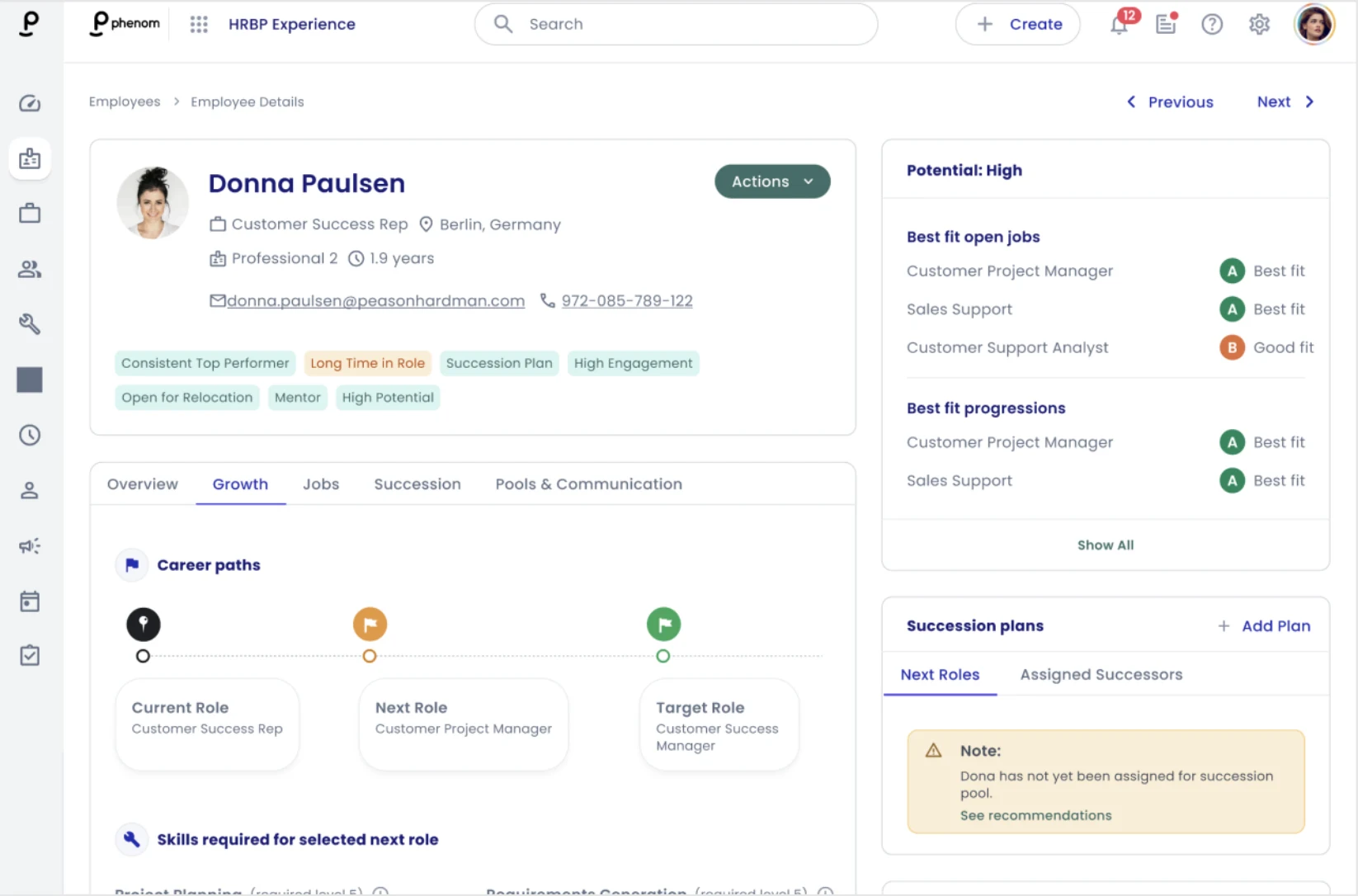
Before a talent conversation, an HR business partner opens an employee profile in ERM, which shows their skills against the level the next role requires, the path they set, the jobs they fit, and whether they’re in a succession plan. Tags such as Long Time in Role sit beside the skills. It’s the same profile the employee builds in the career tools, so the conversation starts from what’s there, not memory.


Skills against the next role. Each required skill shows its level and where the employee stands.


Best fits on the profile Open jobs and career progressions the employee fits, each with a grade.


Into a pool or a plan. Add the employee to a talent pool or a succession plan from the profile.


Screenshot 2026-09-12 at 7.40.41 PM

HR's view runs on what employees are actually using.

ERM does not hold a copy of the workforce. The profiles, skills, and career activity it shows are the same ones employees create in the products they use, which is why HR sees what actually happened, not last quarter's version of it.

  • Live signals, ready pools

    Inside ERM, employees match into the pools that feed Succession Planning slates, so a plan begins with everyone who qualifies instead of everyone a leader can recall. Movement along Career Pathing paths and engagement in Talent Marketplace are most of what ERM reads: progress, stalls, closing skill gaps, gigs, and mentors.so engagement in the marketplace is what gives ERM something to act on.

    Learn more
  • AI Infrastructure

    Inside ERM, AI reads career activity across the workforce and surfaces the patterns worth a conversation, matches employees into HR's pools and re-matches them as profiles change, and runs the agents that improve the data. Profile Builder and Skills Validation are configured in ERM's settings; Workforce Planning draws on the view ERM maintains.

    Learn more
  • Security & Trust

    Employee profiles, career activity, and the signals drawn from them are among the most sensitive data an HR team holds, so access to them is set by role: profiles, pools, and activity views are visible only to the people you designate. Your HR system stays the system of record for the employee. SOC 2 Type II certified, GDPR and CCPA compliant, with AES-256 encryption and annual penetration testing protecting every employee profile the product touches.

    Learn more

Critical employee information, now visible.

200k+

skills activated on employee profiles

19

skills on the average employee profile

23k+

unique skills captured, across 200+ categories

Have the conversation while it still counts.

Book a demo

Helping a billion people find the right work.

AI & Products

All ProductsApplied AITalent CRMIntelligent Career SiteOnboardingSuccession PlanningTalent MarketplaceVoice Screening AgentFraud Detection AgentAI InterviewerAutomated Interview Scheduling

Solutions

By Industry

All IndustriesHealthcareFinancial ServicesRetail & HospitalityManufacturingTechnology & ITTransportation & LogisticsEnergy & UtilitiesPublic Sector

By Use Case

All Use CasesAttract & EngageHire EfficientlyFill Roles FasterDevelop & RetainWorkforce PlanningGrow Your BusinessAI Governance & Security

Company

About UsOur CustomersNewsroomCareersPartnersAI EthicsSecurity & TrustContact Us

For Customers

Customer ExperienceGlobal Professional ServicesGlobal Customer CareTraining & Certification

Resources

All ResourcesBlogCustomer StoriesEventsCommunityAI & Automation LabPhenom StudiosProduct Tours
  • Privacy
  • Terms of Use
  • Security Policy
  • Vulnerability Disclosure Policy
  • Sitemap
  • Twitter2

© 2026 Phenom People, Inc. All Rights Reserved.

  • ANA DPF Dispute Resoultion logo
  • CSA logo
  • IAF
  • ISO 27001
  • ISO 27701
  • ISO 27017
  • ISO 27018
  • ANAB