Log inBook Demo
Book Demo
  • Applied AI
  • Engines/Integrations
  • Ontologies
  • AI Agents
  • WorkOps
  • Skills
  • Generative AI
  • AI Ethics
  • Automation
  • Security & Trust
Explore Phenom AI
Hire Faster
  • Talent CRM
  • Intelligent Career Site
  • Automated Interview Scheduling
See all
Develop & Retain Longer
  • Onboarding
  • Talent Marketplace
  • Career Pathing
See all
Workforce Planning
  • Workforce Intelligence
  • X+ Talent Advisor
See all
Build Trust in AI
  • Unified Orchestration Engine
  • Application Performance Monitoring
  • AppTrail
See all
The AI Agents
  • Voice Screening Agent
  • Fraud Detection Agent
  • Career Coach Agent
See all
All products
Healthcare
  • Hospitals
  • Elderly Care
  • Home Health
See all
Technology & IT
  • Business & IT Services
  • E-Commerce
  • Data Centers
See all
Financial Services
  • Consumer Banking
  • Consumer Finance
  • Insurance
See all
Transportation & Logistics
  • Airlines
  • Trucking/Logistics
  • Rail, Bus & Taxi
See all
Retail & Hospitality
  • Quick Service Restaurants
  • Gas & Convenience Stores
  • Hotels/Lodging & Resorts
See all
Energy & Utilities
  • Electricity & Power
  • Oil & Gas
  • Water & Waste Treatment
See all
Manufacturing
  • Pharmaceuticals
  • Semi-Conductors
  • Food & Beverage
See all
Public Sector
  • Federal Government
  • State & Local Government
  • Higher Education
See all
All Industries
Attract & Engage
  • Create Better Job Descriptions
  • Source the Best Talent
  • Attract & Engage Candidates
See all
Hire Efficiently
  • Validate Candidate Skills
  • Eliminate Scheduling Friction
  • Analyze Every Interview
See all
Fill Roles Faster
  • Scale High-Volume Hiring
  • Compress Time-to-Hire
  • Source Specialized Talent
See all
Develop Better
  • Speed Up Onboarding
  • Mobilize Internal Talent
  • Build Your Next Leaders
See all
Build the Right Workforce
  • See Skills Supply & Demand
  • Redesign Work
  • Plan Your Workforce
See all
Grow your business
  • Bridge the Execution Gap
  • Accelerate AI Adoption
  • Activate Your EVP
See all
Build trust in your AI
  • Meet Strict Security Standards
  • Prove Compliance
  • Unify Your Tech Stack
See all
All use cases
Resources
  • Blog
  • Customer Stories
  • Webinars
  • Events
  • eBooks & Reports
  • Free Tools
  • Community
  • AI & Automation Lab
Phenom Studios
  • All Videos
  • Product tours
  • AI Day On Demand
  • IAMPHENOM On Demand
  • IAMPHENOM India On Demand
  • IAMPHENOM Europe On Demand
All resources
About Phenom
  • About us
  • Our customers
  • Newsroom
  • Careers
  • AI Ethics
  • Security & Trust Center
  • Partners
  • Contact us
For Customers
  • Customer Experience
  • Global Professional Services
  • Global Customer Care
  • Customer Value
  • Training & Certification
  • Refer a Phriend
  • Applied AI
  • Engines/Integrations
  • Ontologies
  • AI Agents
  • WorkOps
  • Skills
  • Generative AI
  • AI Ethics
  • Automation
  • Security & Trust
Explore Phenom AI
Hire Faster
  • Talent CRM
  • Intelligent Career Site
  • Automated Interview Scheduling
See all
Develop & Retain Longer
  • Onboarding
  • Talent Marketplace
  • Career Pathing
See all
Workforce Planning
  • Workforce Intelligence
  • X+ Talent Advisor
See all
Build Trust in AI
  • Unified Orchestration Engine
  • Application Performance Monitoring
  • AppTrail
See all
The AI Agents
  • Voice Screening Agent
  • Fraud Detection Agent
  • Career Coach Agent
See all
All products
Healthcare
  • Hospitals
  • Elderly Care
  • Home Health
See all
Technology & IT
  • Business & IT Services
  • E-Commerce
  • Data Centers
See all
Financial Services
  • Consumer Banking
  • Consumer Finance
  • Insurance
See all
Transportation & Logistics
  • Airlines
  • Trucking/Logistics
  • Rail, Bus & Taxi
See all
Retail & Hospitality
  • Quick Service Restaurants
  • Gas & Convenience Stores
  • Hotels/Lodging & Resorts
See all
Energy & Utilities
  • Electricity & Power
  • Oil & Gas
  • Water & Waste Treatment
See all
Manufacturing
  • Pharmaceuticals
  • Semi-Conductors
  • Food & Beverage
See all
Public Sector
  • Federal Government
  • State & Local Government
  • Higher Education
See all
All Industries
Attract & Engage
  • Create Better Job Descriptions
  • Source the Best Talent
  • Attract & Engage Candidates
See all
Hire Efficiently
  • Validate Candidate Skills
  • Eliminate Scheduling Friction
  • Analyze Every Interview
See all
Fill Roles Faster
  • Scale High-Volume Hiring
  • Compress Time-to-Hire
  • Source Specialized Talent
See all
Develop Better
  • Speed Up Onboarding
  • Mobilize Internal Talent
  • Build Your Next Leaders
See all
Build the Right Workforce
  • See Skills Supply & Demand
  • Redesign Work
  • Plan Your Workforce
See all
Grow your business
  • Bridge the Execution Gap
  • Accelerate AI Adoption
  • Activate Your EVP
See all
Build trust in your AI
  • Meet Strict Security Standards
  • Prove Compliance
  • Unify Your Tech Stack
See all
All use cases
Resources
  • Blog
  • Customer Stories
  • Webinars
  • Events
  • eBooks & Reports
  • Free Tools
  • Community
  • AI & Automation Lab
Phenom Studios
  • All Videos
  • Product tours
  • AI Day On Demand
  • IAMPHENOM On Demand
  • IAMPHENOM India On Demand
  • IAMPHENOM Europe On Demand
All resources
About Phenom
  • About us
  • Our customers
  • Newsroom
  • Careers
  • AI Ethics
  • Security & Trust Center
  • Partners
  • Contact us
For Customers
  • Customer Experience
  • Global Professional Services
  • Global Customer Care
  • Customer Value
  • Training & Certification
  • Refer a Phriend
Book DemoLog in
Resource Library
BlogCustomer StoriesBooks & ReportsWebinarsFree ToolsEvents
Blog headshot
Branka NikolicJuly 15, 2026
Topics: Customer Stories

How HPE and Bon Secours Scaled Career Site Rebrands with Design Studio

A corporate rebrand is either a bottleneck or an accelerant, depending on the tools you’re working with. For HPE and Bon Secours Mercy Health (BSMH), it was both — first one, then the other. 

When each organization faced pressure to update their employer brand presence, they were working in Content Management System (CMS) environments that made scale nearly impossible. Moving to Phenom Design Studio changed that equation.

HPE’s Rachel Duran, Head of Global Employer Brand and Recruitment Marketing, and BSMH’s Amy Lane, Manager, Recruitment Marketing & Brand Strategy, shared what an employer rebrand looks like when your career site is built for it.

Watch the full session here, or explore the highlights below.

Why Was Scaling a Career Site Rebrand Difficult?
Career Site Rebrand Challenges

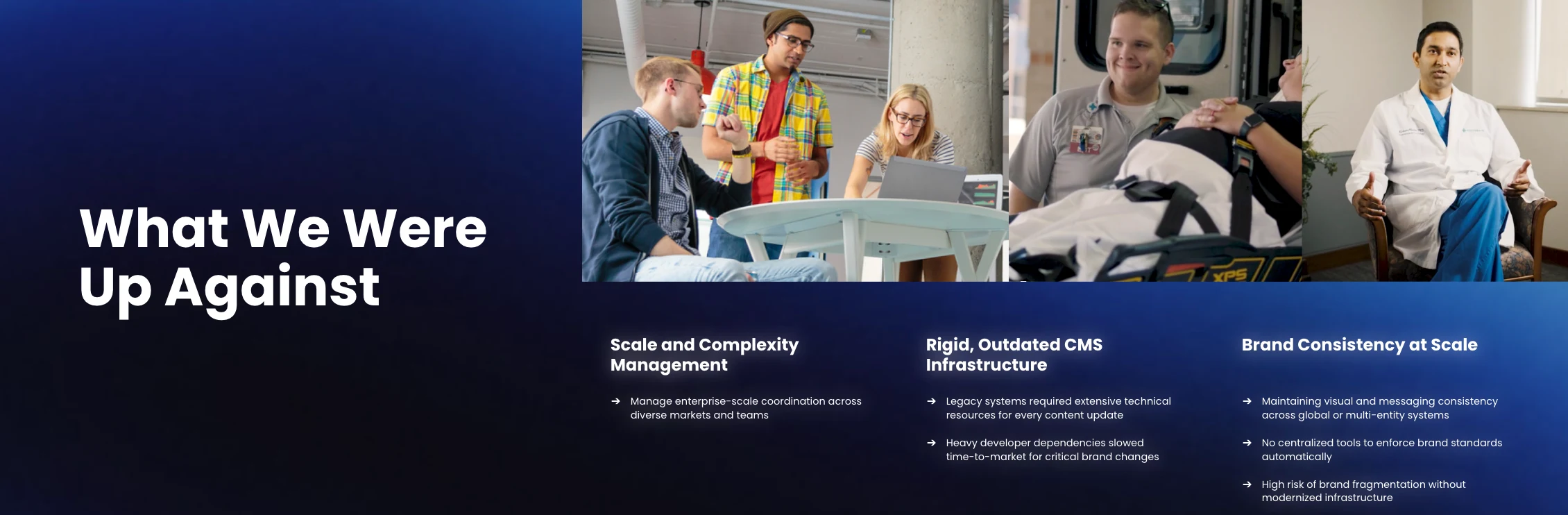
HPE manages over 100 landing pages with regional recruitment marketing managers across the globe. In a standard CMS, keeping every page visually consistent was a losing battle. “It was easy to lose touch on the brand synchronicity,” Duran said. Updating a single component meant going page by page, and anything built for one page had to be manually replicated everywhere else.

BSMH faced a different complexity: a family of seven tenants and subtenants, 250-plus content pages, and a brand architecture that had to reflect distinct lines of care without fragmenting the candidate experience. Each update created a bottleneck. The team was small but the scope was enterprise-level, and the legacy CMS didn’t have the flexibility to keep up.

Related: How To Redesign Your Careers Page Without Developers

How Did Each Company Approach Design Studio Migration?
How Can Companies Approach Design Studio Migration

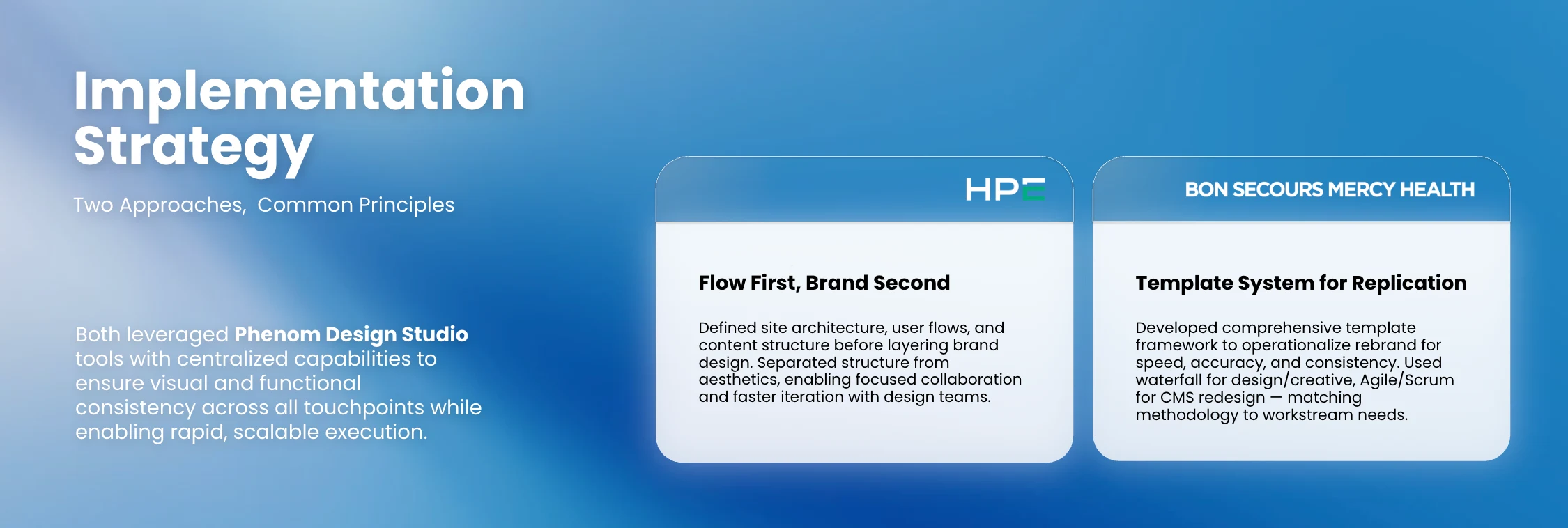
Both teams emphasized phased execution over launching everything at once. BSMH built a template system with naming conventions for every preset, then ran the implementation in sprints — waterfall planning up front with an agile delivery on the way through. “Some people call that over-planning. We call it successful planning,” Lane said. Seven tenants mean seven times the surface area for errors, so the infrastructure had to be right before content went live.

HPE prioritized the candidate journey before the visual layer. The team mapped out every page’s purpose, its connections to other pages, and the intended call to action before touching a single design element. When it was time for the full brand refresh, the system was already organized to absorb it. The switch to Design Studio happened as a “referendum swap”: HPE built the new site in parallel with the live CMS version, scheduled a specific date and time to switch, QA’d with a cross-functional team for 48 hours, and iterated from there.

Three specific Design Studio capabilities drove the most impact for both teams: 

  • Theme management with brand control at the tenant, page, and even brand extension level

  • Global widgets that enable updating content once to reflect it everywhere

  • The sophistication of the widget library

Duran described a custom video widget she’d spent weeks trying to build in the original CMS. In Design Studio, it only took 15 minutes. For Bon Secours, global widgets supported everything from FAQ pages to talent community prompts and content built for LLM and AI search engine indexing that was surfacing measurable results.

What Results Can You Expect From a Design Studio Migration?

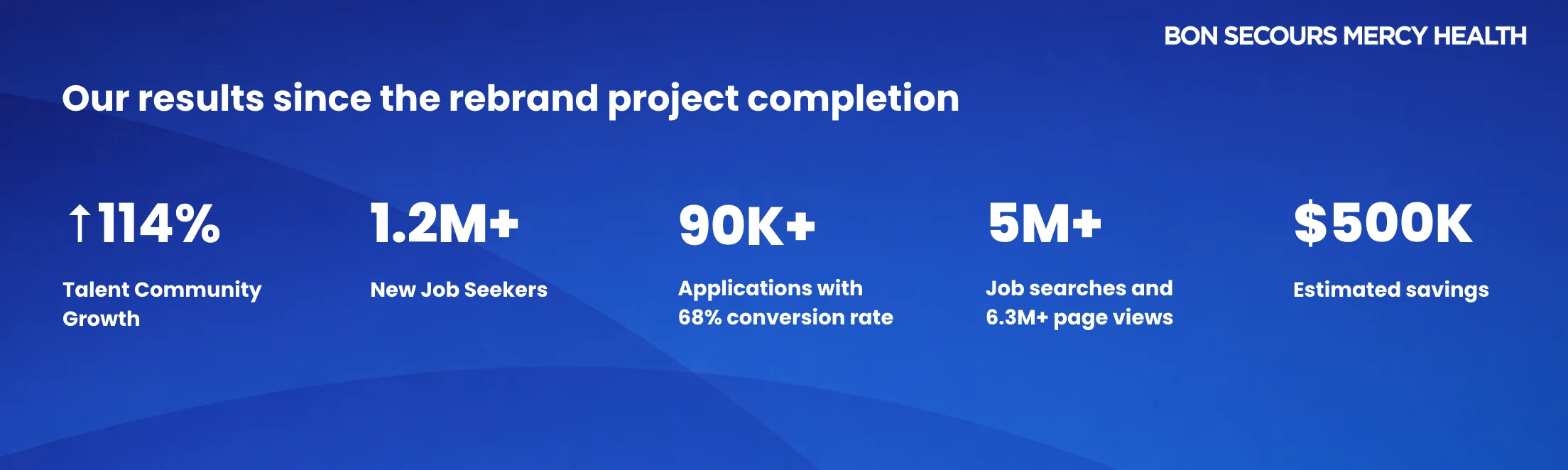
Both organizations were measuring different things, but the direction was consistent. Engagement went up, and the workload went down. BSMH, which completed its full seven-tenant rebrand in 31 business days, focused on scaling a complex multi-brand rebrand without adding operational overhead to achieve: 

  • $500K savings

  • 114% talent community growth

  • 1.2M+ new job seekers

  • 90K+ applications with a 68% conversion rate

  • 5M+ job searches 

"Thirty-one business days across seven entities or brands is not a lot of time," Lane said. The results reflect what that kind of compressed execution required. Their talent community growth didn’t happen by accident. A global widget placed below every job listing prompts candidates to join the talent community when they don’t see a role that fits. Paired with a campaign push right after launch and chatbot prompts directing candidates to join, the 114% increase reflects a deliberate infrastructure decision, not just traffic momentum.
What Results Can You Expect From a Design Studio Migration?

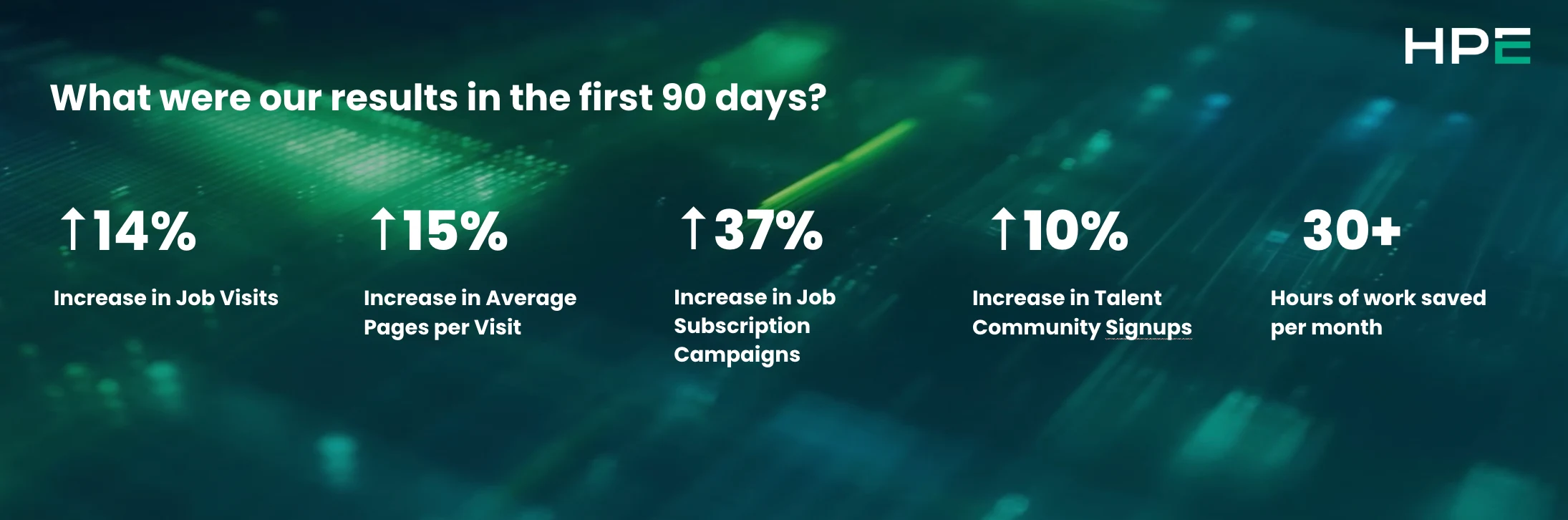
HPE centered its redesign on creating a more effective candidate journey. Their results show how those different strategies translated into measurable business impact:

  • 30+ hours of work saved per month

  • 14% increase in job visits

  • 10% increase in Talent Community sign-ups

  • 15% increase in average pages per visit

  • 37% increase in job subscription campaigns

HPE’s time saved came directly from the benefit of having global widgets. The team identified several components that needed to live on every landing page — components they previously had to maintain manually across more than 100 pages. With a single global widget, one update now propagates everywhere. That math adds up fast when you’re working at scale.
Design Studio Results in First 90 days

How Are They Optimizing Their Career Sites?

Neither team treats their career site as finished. BSMH runs a bi-weekly site map meeting, a standing review of existing pages alongside incoming projects. HPE actively tells its stakeholders the site is never “done,” and backs that up with roadmaps of what is to come. 

Both are expanding their LLM and AI search optimization through FAQ widgets and pages, building content around the questions candidates are actually asking (sourced from chatbot data, analytics, surveys, and job search behavior) to meet candidates earlier in their search journey. For BSMH, the approach is already showing up in the numbers. "We're seeing through Phenom analytics that source traffic from large language models is increasing, and our candidates from those sources are converting to hire at about 80%," Lane said.

HPE is moving into language personas as the next phase, building region-specific candidate experiences for markets like Japan and Canada. The Design Studio infrastructure makes that possible without starting from scratch. 

The broader lessons learned? “Don’t try to design and build at the same time. Nail your site structure and candidate flows first, then layer in your brand, because that separation makes every decision faster and every collaboration more productive,” said Duran. A site that’s easy to navigate will outperform a beautiful site that candidates can’t figure out.


Get a live demo of Phenom Design Studio in action!

Blog headshot
Branka Nikolic

Branka’s a marketer with flair, a teacher turned Phenom player. She loves products that shine, making candidates’ paths fine and turns job hunts into a winner.


Related

3-ways-emapthy.jpeg
3 Ways to Campaign to Candidates with Empathy
2012x700_Quiet_Quitting.jpg
Quiet Quitting: How to Think About It

Get the latest talent experience insights delivered to your inbox.

Sign up to the Phenom email list for weekly updates!

Loading...

Helping a billion people find the right work.

AI & Products

All ProductsApplied AITalent CRMIntelligent Career SiteOnboardingSuccession PlanningTalent MarketplaceVoice Screening AgentFraud Detection AgentAI InterviewerAutomated Interview Scheduling

Solutions

By Industry

All IndustriesHealthcareFinancial ServicesRetail & HospitalityManufacturingTechnology & ITTransportation & LogisticsEnergy & UtilitiesPublic Sector

By Use Case

All Use CasesAttract & EngageHire EfficientlyFill Roles FasterDevelop & RetainWorkforce PlanningGrow Your BusinessAI Governance & Security

Company

About UsOur CustomersNewsroomCareersPartnersAI EthicsSecurity & TrustContact Us

For Customers

Customer ExperienceGlobal Professional ServicesGlobal Customer CareTraining & Certification

Resources

All ResourcesBlogCustomer StoriesEventsCommunityAI & Automation LabPhenom StudiosProduct Tours
  • Privacy
  • Terms of Use
  • Security Policy
  • Vulnerability Disclosure Policy
  • Sitemap
  • Twitter2

© 2026 Phenom People, Inc. All Rights Reserved.

  • ANA DPF Dispute Resoultion logo
  • CSA logo
  • IAF
  • ISO 27001
  • ISO 27701
  • ISO 27017
  • ISO 27018
  • ANAB