

3 Steps to Nail Interview Scheduling Fundamentals and Speed Up 1:1 Interviews
Interview scheduling can make or break a hire. The time between a candidate showing interest and confirming an interview is where momentum is either maintained or lost. A candidate who just passed a screen or submitted an application is ready to engage. When scheduling takes too long, or interview details are scattered across emails and calendars, that momentum fades. Decisions get delayed, coordination increases, and recruiters spend more time managing logistics than truly evaluating candidates.
This is where Phenom Automated Interview Scheduling brings one connected system by automating interview booking, standardizing early conversations, and giving recruiters a single view of every scheduled interaction.
This guide breaks down interview scheduling into three connected steps designed to reduce delays and keep interviews moving forward. Together, these steps are powered by automation to handle today’s hiring volume without unnecessary back-and-forth. It focuses on three core capabilities built to make that possible: 1:1 Interviews, personal scheduling links, and the interview dashboard.
Stage 1: Automate one-to-one interview scheduling
Most of the coordination in interview scheduling happens outside the system. A recruiter suggests available times, the candidate responds with one option, the recruiter confirms, and then manually updates the interviewer's calendar. By the time both parties have a confirmed slot, two to three days have passed. That delay repeats at every interview stage and compounds across your entire pipeline.
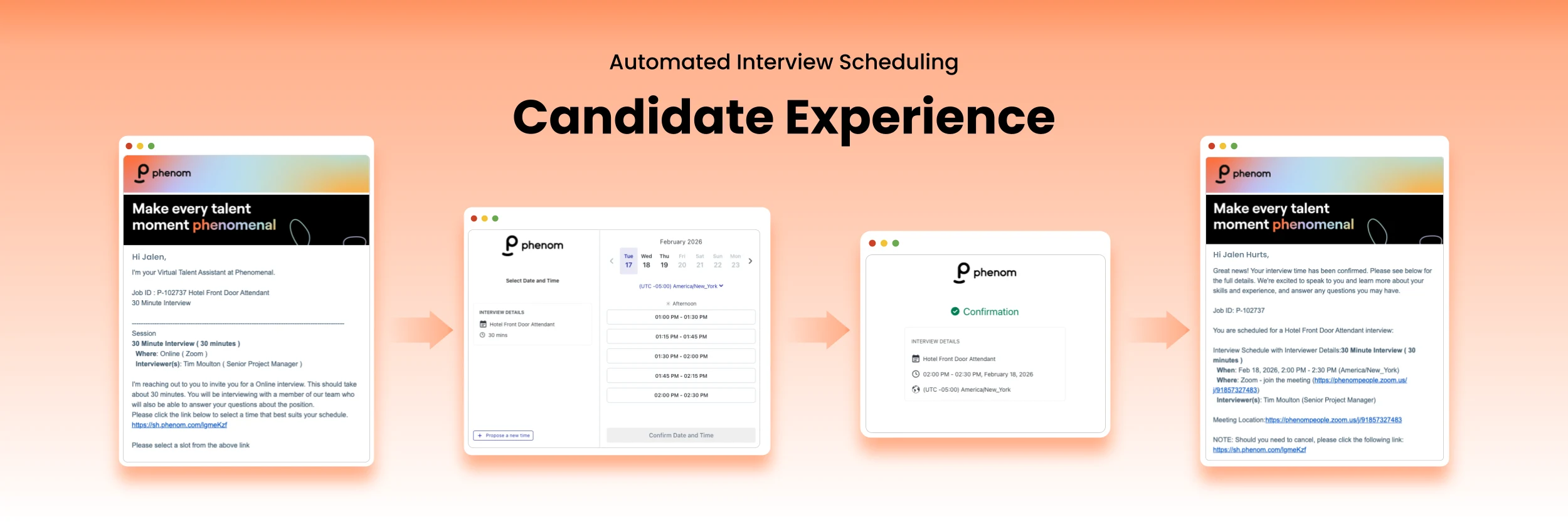
The 1:1 Interviews feature in Phenom replaces that back-and-forth with a single scheduling link that shows real-time interviewer availability. Candidates select their preferred time in one action, and the system confirms both parties instantly with calendar blocks sent to each side. No follow-up messages, no manual calendar updates.
Related: Dear Phenom: How AI Scheduling Transforms Interview Coordination for Busy Recruiters
Sending your first 1:1 interview invite
Navigate to the relevant job in Phenom and select the candidates you want to invite. From there, the setup takes a few steps:
Select one or more candidates and choose "Invite to Job Interview" from the "More Actions" menu
Choose "Single Interview" and add the interview details: title, interviewer, duration, and meeting type
Select the available time slots from your calendar and send the scheduling invite by email
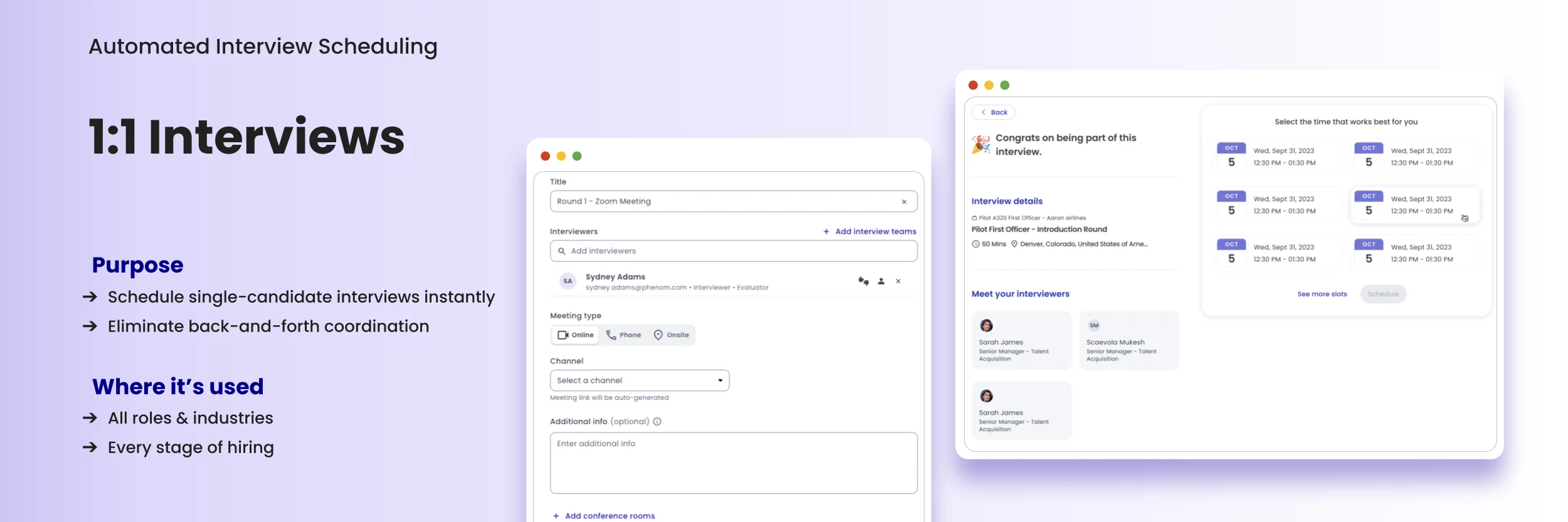
Once candidates select a time, automated notifications go to both the candidate and the interviewer with built-in rescheduling options. For bulk invitations across ten or more candidates, each receives their own separate scheduling link with real-time availability. If an interviewer's calendar shows a blocked slot you know is flexible, the availability override prevents that block from limiting candidate options. With 1:1 scheduling running for active roles, the next step is extending that same speed to conversations that happen outside a formal requisition.
Tip: When sending bulk invitations, review the interviewer's available windows before sending. A narrow availability window on a high-volume role can delay the entire batch if candidates find no open slots.
Stage 2: Share personal scheduling links for early-stage conversations
Not every recruiter conversation ties to an active job requisition. Exploratory calls, referral conversations, and pipeline-building meetings happen in the gaps between formal hiring stages, and because they are not job-linked, they often get scheduled informally or not at all.
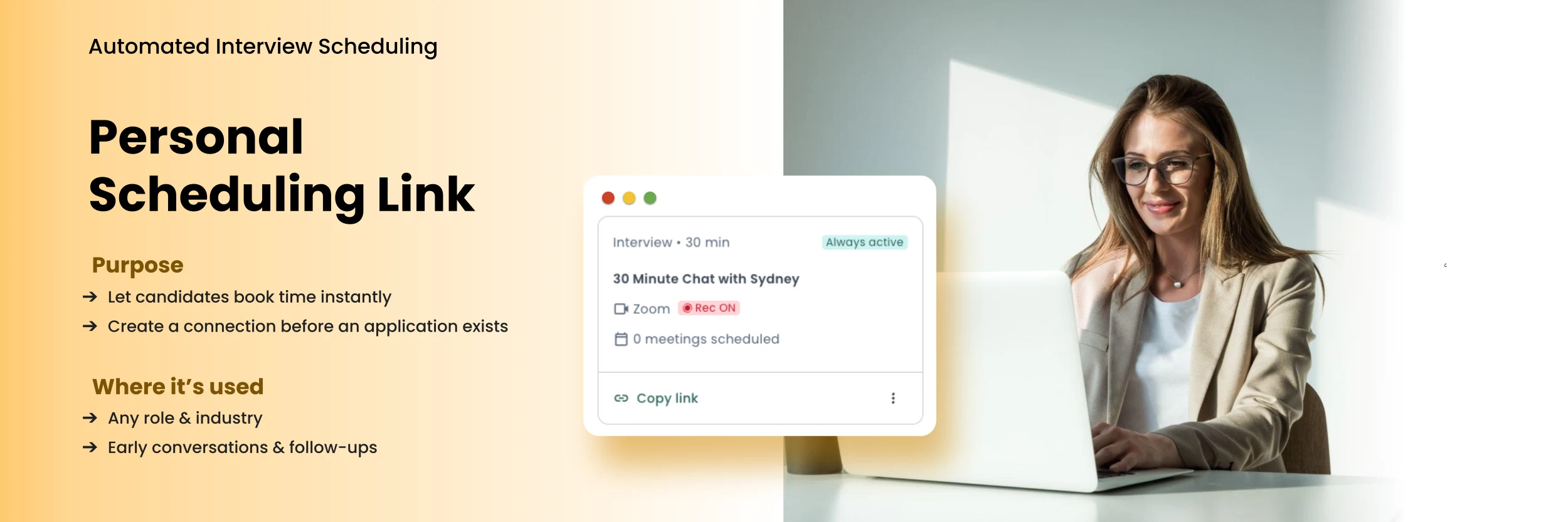
The Personal Scheduling Link creates a booking page independent of any specific role that is tied directly to a recruiter's calendar. Candidates visit the link, see real-time availability, and book without any back-and-forth. It is particularly useful for passive talent engagement, early outreach, and candidate reconnections where the next step is still being defined.
Creating your personal interview scheduling link
Navigate to the Scheduling Link section from your CRM dashboard. The configuration options give you control over how and when candidates can book:
Setting | Options | When to use |
|---|---|---|
Meeting purpose | Interview, general meeting, intake | Match the purpose to the type of conversation being scheduled |
Meeting type | Online, phone, on-site | Set based on your team's preferred format for early-stage calls |
Availability window | Custom date range | Limit booking to a specific period, for example, an active sourcing sprint |
Expiration and booking limits | Daily or weekly caps | Useful for high-volume outreach where you want to control calendar load |
Once the link is live, copy and share it directly in outreach messages. Active links remain accessible at the bottom of your CRM dashboard, where you can edit, deactivate, or duplicate them as needed.
Personal scheduling links work well as a standard addition to sourcing outreach templates. Adding a booking link to an initial outreach message removes the response barrier for passive candidates who are interested but unlikely to reply to a scheduling request. Once early-stage conversations are running through a consistent booking flow, the final step is bringing visibility to everything happening across all your scheduled interviews.
Stage 3: Centralize interview activity through the Interview Dashboard
When interviews are tracked across email threads, calendar invites, and informal notes, hiring teams lose visibility.. Status updates require manual checking, and delays go unnoticed until a candidate has already dropped out.
The Interview Dashboard gives recruiters a single view of every scheduled interview across their pipeline. Each record shows the candidate name, role, interviewer, scheduled date, and current status in a filterable interface. The dashboard flags interviews that need action so recruiters are always informed and ready to take action.
Related: How can automated interview scheduling simplify your recruiting process?
Using the Interview Dashboard
Access the dashboard by navigating to the My Meetings section on your CRM homepage. From there:
Review the available columns: name, purpose, job, interviewer, initiated date, and status
Filter by status to focus on what needs attention: pending, upcoming, completed, or canceled
Use the activity tracking view to identify interviews where action is overdue or a response has not been received
Pro Tip: The dashboard is most effective when it becomes the starting point for a recruiter's day rather than a reference tool checked reactively. Teams that build a daily review habit catch scheduling gaps before they affect candidates.
The interview automation difference
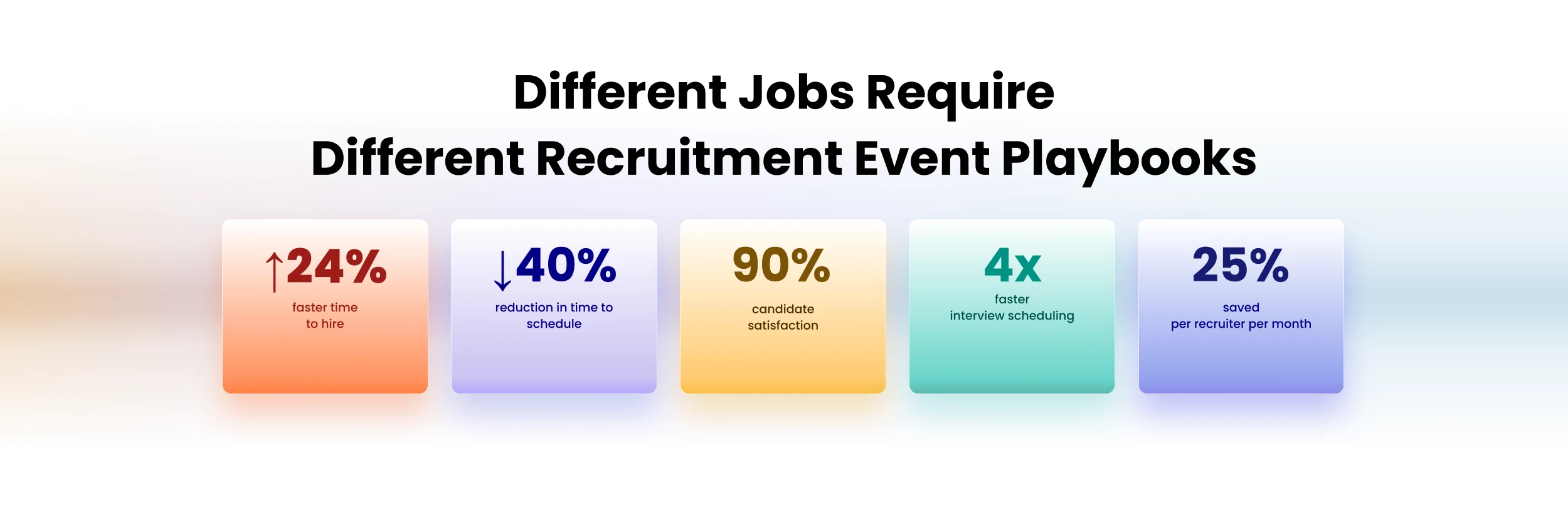
When all three stages work together, scheduling becomes predictable, and hiring timelines stabilize. Teams that implement this model reduce coordination time and keep candidates moving forward without delays. Here are some real-world results of coordinated interview scheduling:
87% faster interview scheduling: candidates book directly into the interviewer's availability instead of waiting for manual confirmation
24% faster hiring cycles: removing scheduling friction at every stage shortens time to hire
90% candidate satisfaction: faster, more professional booking experiences shape positive first impressions
14+ hours saved per recruiter per month: automation frees up time previously spent coordinating calendars
Related: 5 Examples of Companies that Transformed Hiring With Automated Interview Scheduling Assistants
Your next move to interview automation
The most effective path is to start with the capability that replaces your highest-volume manual task and build from there:
Start with 1:1 Interviews for your most active role: this delivers immediate impact by replacing the most repetitive coordination task in your workflow. Run one role through the full automated flow before expanding to others.
Add Personal Scheduling Links to early-stage outreach once 1:1 scheduling is routine: use them for exploratory conversations, referral calls, and passive candidate engagement so pipeline-building runs on the same automated model as formal interviews.
Monitor the Interview Dashboard throughout: treat it as your primary scheduling view, not a backup. It surfaces bottlenecks in real time and keeps every interview accounted for without manual tracking.
The time you get back
Removing calendar coordination from the recruiting process does not just save time. It completely transforms your recruiters’ focus. When interview scheduling is automated across every stage, from the first exploratory call through to final round interviews, the team's attention shifts from logistics to the conversations and decisions that determine who gets hired. That shift is where the real value of automated scheduling becomes visible.
Want to learn more about interview scheduling? Your Account Manager can help you configure your first 1:1 interview flow, set up your personal scheduling links, and make sure the Interview Dashboard is giving your team the visibility it needs across your full pipeline.

Devi is a content marketing writer passionate about crafting content that informs and engages. Outside of work, you'll find her watching films or listening to NFAK.


Get the latest applied AI insights delivered to your inbox.
Sign up to stay up-to-date on the latest original content from Phenom, including new podcast episodes, events, and more.


