

3 Ways Talent CRM Automations Reduce Time-to-Hire Without Sacrificing Quality
For most recruiting teams, time-to-hire isn't lost in one place. It compounds across small, repetitive tasks at every stage: a follow-up email, a status update, a screening questionnaire. Phenom's Talent CRM automations are built to handle exactly those tasks in line without manual intervention.
This blog covers three stages of the hiring journey where Talent CRM (Candidate Relationship Management) inline automations deliver the most consistent value to execute tasks, with guidance on how to build each one independently of technical support.
What Automations Are Built to Do
Automations are not designed to replace people. They exist to free recruiting teams from repetitive administrative work, so that time can be devoted to higher-value strategic decision-making activities.
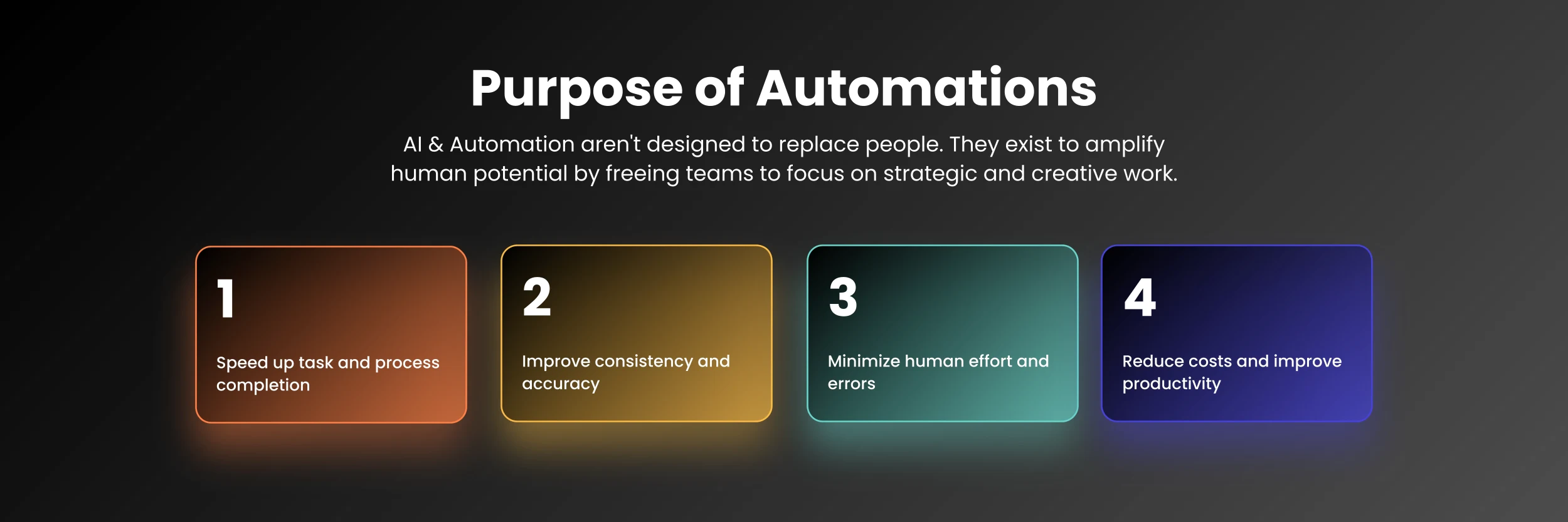
Within Phenom's Talent CRM, automations serve four purposes:
Automate tasks across every stage of the hiring funnel
Improve consistency and accuracy by removing manual variability
Minimize manual error on tasks that follow predictable, repeatable patterns
Reduce costs and improve productivity by taking over administrative tasks
These benefits apply across every persona in the talent acquisition (TA) function, from sourcers and recruiters to talent marketers, event coordinators, and hiring managers.
Talent CRM Automations Vs. Hiring Automations
Phenom applies automation in two distinct ways, via Talent CRM automation and Hiring Automation. Understanding the differences is key to developing an automation strategy to achieve desired outcomes from campaign scheduling via the Talent CRM to full workflow orchestration, which moves candidates through hiring flows with predefined logic.
Talent CRM Automations | Hiring Automations | |
|---|---|---|
Scope | Single, task-oriented actions | End-to-end workflows |
Execution | Asynchronous | Inline |
Focus | Candidate-based triggers within the Talent CRM | Connects multiple Phenom tools |
Best for | Targeted, stage-specific tasks | Full hiring workflow orchestration |
Let’s start with who can create Talent CRM automations. Within the Talent CRM, two permission levels can create and modify them: Talent CRM Master Admins and Talent CRM Automations Admins. This is to ensure automations remain consistent across teams. All other users can view active automations but cannot build or change them.
When considering how to most effectively take advantage of Talen CRM automations, there are three essential automations to address specific bottlenecks in hiring workflows: lead nurturing, candidate screening, and interview-stage communication.
1. Engage Existing CRM Candidates
The ability to connect, nurture every candidate, and lead in a personal manner is a true challenge for recruiting teams. In fact, analytics from Phenom users show that, on average, recruiters actively engage with roughly 65-75% of candidates in the Talent CRM. The remaining quarter to a third receive no outreach at all. This isn’t a choice; there is simply not enough bandwidth to act on every new lead manually. Let’s explore how automation extends recruiter reach.
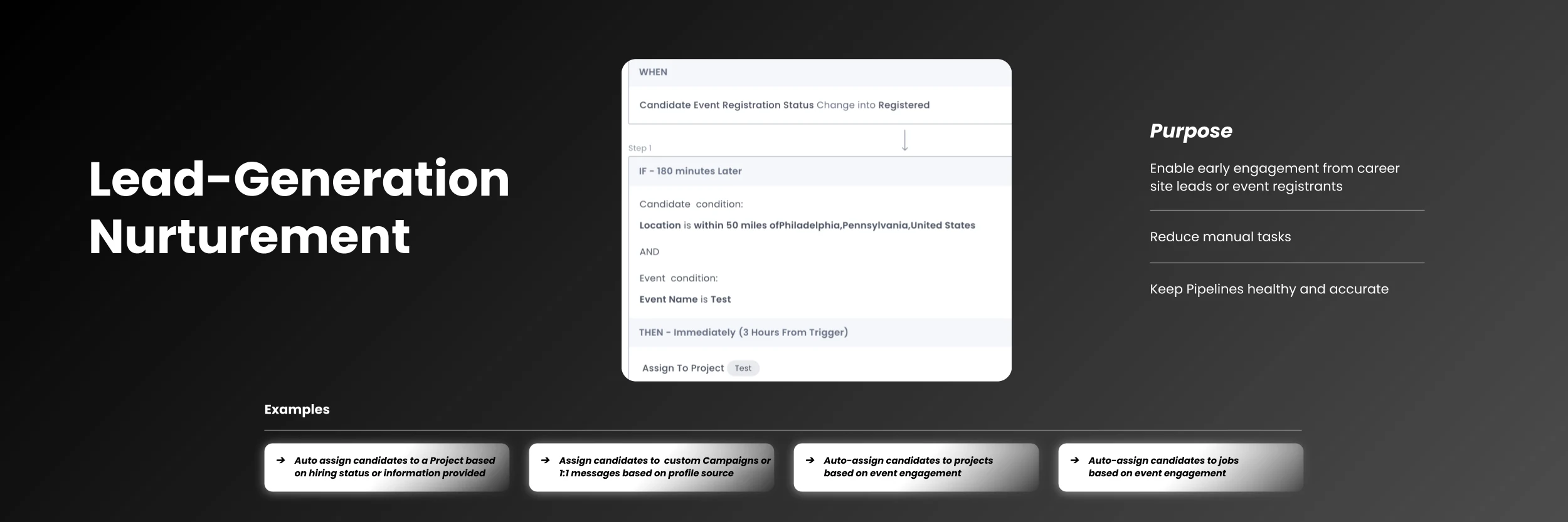
Connecting Leads to Talent Communities:
The purpose of a Talent Community is to build a talent pool of candidates who are actively interested in joining your organization, but there may not be an active role that meets their skills. Talent Communities allow you to aggregate, communicate, and nurture candidates by keeping them engaged with all that is happening at your organization.
Set your trigger: Select the candidate profile created to fire the automation when a brand-new lead enters the system. Keep in mind that automations are not retroactive. For candidates already in the system, use advanced search filters to identify them, send the relevant communication manually, then activate the automation to handle new records going forward.
Add a candidate condition: Target candidates who engaged with your careers site Talent Companion Chatbot as a starting segment. A simple configuration can start by applying a conditional logic profile source is Chatbot AND candidate is not in Talent Community. This captures high-intent leads who have not yet been nurtured.
Define the action: Enroll those candidates in an always-on campaign, such as a Join Talent Community drip. Always-on campaigns never expire, meaning every candidate who meets the criteria going forward is enrolled automatically.
Layer additional conditions: Narrow the audience further with a location filter to target candidates within a set radius of a specific city. For event-based hiring, change the trigger to candidate event registration status changes to Registered, add a time delay, and set the action to assign attendees to a relevant project.
Tip: Build the campaign before creating the automation formula. The campaign needs to exist in the system to be selectable at the action step.
2. Automated Screening Without Slowing Down
Screening is where speed and quality pull against each other. Reviewing every applicant manually takes time, lacks consistency, and risks sending unqualified candidates to hiring managers. Automated screening handles the initial filtering, so recruiters engage only with candidates who have already cleared the defined criteria.
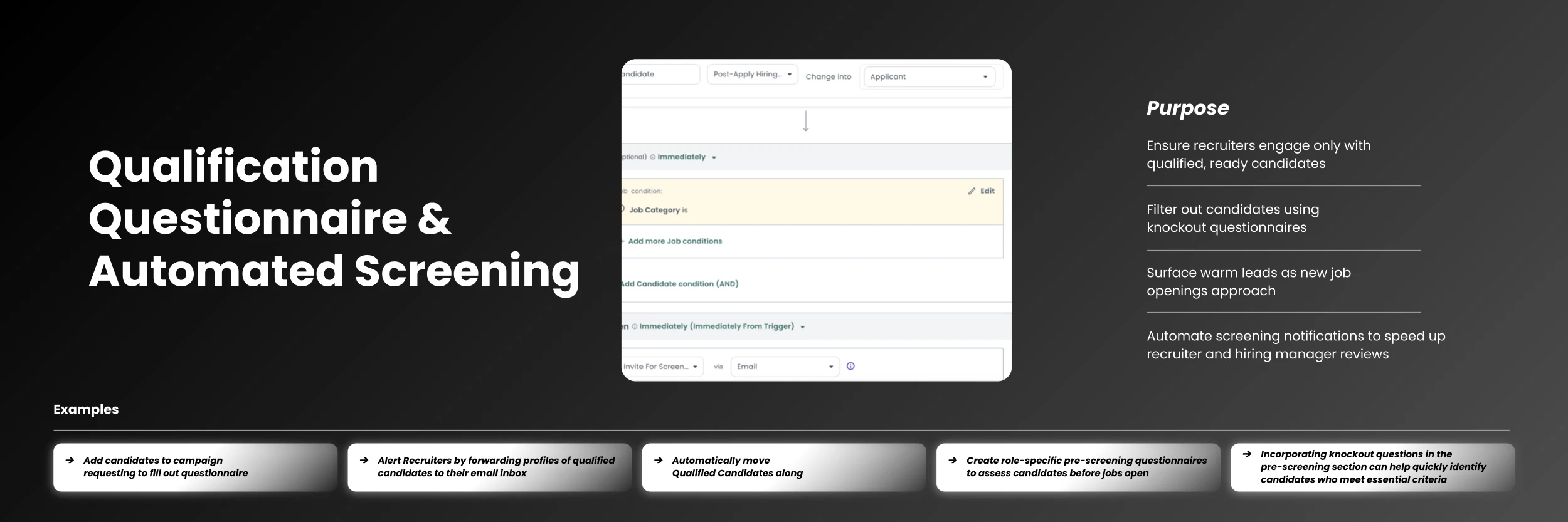
Setting Up Automated Screening and Qualification
Set your trigger: Select the candidate assigned to a job. This trigger fires when a candidate is added to a requisition, whether manually by a recruiter, through expressed interest, or via a sourcing action.
Add a job condition: Specify a job category or job ID to make sure the questionnaire sent matches the role the candidate is being considered for. Without this condition, the automation fires across all open jobs.
Define the action: Enroll the candidate in a campaign containing the screening questionnaire. Include knockout questions to filter candidates against the essential criteria before a recruiter reviews the record.
Branch for outcomes: For candidates who qualify, forward their profile to the recruiter's or hiring manager's inbox, or advance them to the next stage automatically. For those who do not, trigger a non-qualified communication or flag the record for manual review.
Pro tip: Role-specific questionnaires can be built before a job opens. When the requisition goes live, warm candidates from the existing pipeline are surfaced immediately rather than sourced from scratch.
3. Keep Candidates Moving and Informed
Once qualified candidates are identified, the next objective is to get them to apply and keep them engaged throughout the interview process. Most drop-off happens during the wait between steps, when communication goes quiet, and candidates accept offers elsewhere.
Configuring Invite-to-Apply Automations
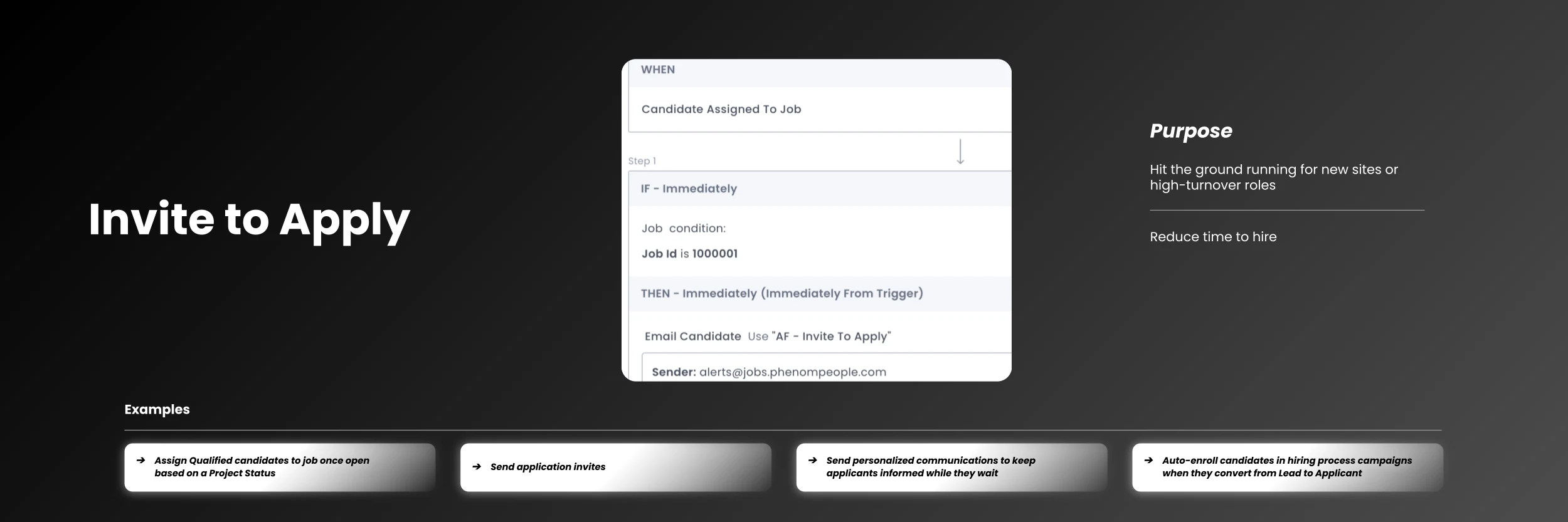
Choose your trigger: Candidate assigned to a job.
Set your conditions: Use a specific job ID or job category, then add a candidate condition filtering by current or past companies. In healthcare hiring, candidates with prior experience at specific health systems can be automatically invited to apply as soon as they are assigned to a matching role.
Define the action: Email the candidate using a pre-built invite-to-apply email template with personalized placeholders such as the job title. Build the email template before creating the formula so it is available at the action step.
4. Automating Communication Through the Interview Process
Getting a candidate to the interview stage is only half the work. Keeping hiring managers informed, collecting feedback on time, and maintaining candidate engagement while decisions are being made are where most processes quietly break down.
Trigger on hiring status changes: Status changes trigger personalized messages that acknowledge the candidate's current status and set expectations for next steps.
Handle outcomes automatically: Apply a silver medalist tag to strong candidates not selected and add them to a nurture project for future roles. Trigger rejection emails without delay for candidates not moving forward. When a role is filled, surface similar open roles to candidates still in consideration.
Pro tip: For teams using Phenom hosted apply, activate the incomplete apply reminder. A notification goes out at the 24-hour mark after an application is abandoned, and a second follows 48 hours later if there is still no action.
How HR Customers Are Measuring the Value
When lead nurturing, screening, and interview-stage communication operate as connected automated workflows, the results show up quickly in hiring speed, candidate conversion, and hours recovered.
Phenom customers who have implemented Talent CRM automations across their hiring workflows report measurable gains at every stage of the process. Teams that reduce manual touchpoints and keep candidates moving without gaps see outcomes that compound over time. The operational impact across industries includes:
Financial services: 27-day decrease in time-to-hire by automating sourcing invites, candidate matching, and interview communications
Retail: 75% drop in candidate drop-off through automated follow-up across campaigns, email, and SMS
Utilities: 51,534 hours saved in a single quarter by automating event-based hiring workflows end-to-end
Healthcare: 21,978 hours saved in three months by triggering screening questionnaires directly from hiring status changes
Related Read: AI vs. Automation in Hiring: How Waste Connections Cut Drop-Off and Collected 13,900 Leads
Getting Started With Talent CRM Automations
The teams that see results quickly share a common approach: start with one repetitive task, build a simple automation around it, test it in staging before deploying to production, and expand from there. Out of the box, the Phenom Talent CRM ships with 16 pre-built automation templates across lead workflows, applicant workflows, interview scheduling, smart tagging, events, and compliance. For teams new to the tool, templates are a fast path to an active automation before building custom formulas from scratch.
Include end-users in the process. Recruiters and sourcers understand their own workflows best and are the most reliable source of ideas for what to automate next. Regular check-ins to review what is working and gather new suggestions keep the automation strategy improving over time.
Your CVM (Customer Value Manager) team can review your business process map, identify the highest-friction points, and help prioritise where to start.

What Changes When CRM and Hiring Automations Are in Place
The shift that CRM automations produce is not just operational. When repetitive tasks are handled by the system, recruiters' attention goes to conversations that require judgment: understanding a candidate's motivations, advising a hiring manager, and making a case for a role. Candidates move through a process that feels responsive rather than slow. Pipelines stay accurate without manual maintenance.
The organizations that build this kind of infrastructure into their hiring workflows are the ones best positioned to hire consistently well, regardless of volume or velocity.
Ready to build your first Talent CRM automation? Connect with your Phenom account manager to map out where CRM automations fit into your current hiring workflow.

Devi is a content marketing writer passionate about crafting content that informs and engages. Outside of work, you'll find her watching films or listening to NFAK.


Get the latest applied AI insights delivered to your inbox.
Sign up to stay up-to-date on the latest original content from Phenom, including new podcast episodes, events, and more.


